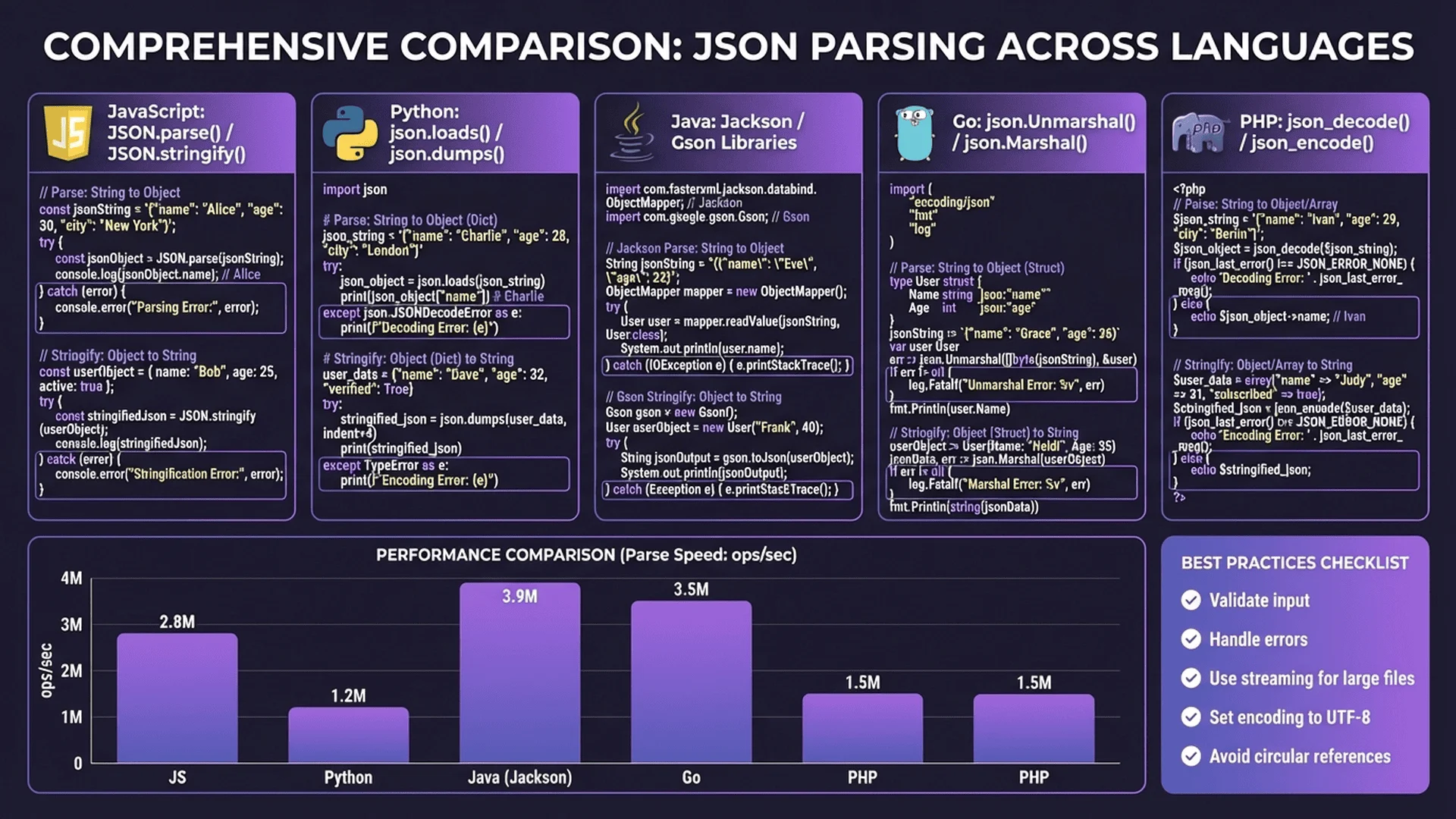
JSON 的誕生與演進
JSON(JavaScript Object Notation)由 Douglas Crockford 在 2001 年提出,最初是為了解決 JavaScript 中的資料交換問題。其設計理念簡單:使用 JavaScript 的物件字面量語法作為資料格式。
為什麼 JSON 如此成功?
相較於 XML,JSON 具有以下優勢:
- 簡潔性:更少的標籤和符號,資料密度更高
- 可讀性:結構清晰,易於人類閱讀和編寫
- 原生支援:JavaScript 原生支援,無需額外解析器
- 跨語言:幾乎所有現代程式語言都支援 JSON
- 輕量級:檔案體積小,網路傳輸效率高
JSON vs XML 比較
// JSON(58 字元)
{"name":"Alice","age":25,"city":"Taipei"}

// XML(93 字元)
<person>
  <name>Alice</name>
  <age>25</age>
  <city>Taipei</city>
</person>
JSON 節省約 38% 的空間!
標準化進程
JSON 的標準化歷程:
- 2006:RFC 4627 成為第一個 JSON 規範
- 2013:ECMA-404 標準發布
- 2017:RFC 8259 成為當前標準(取代 RFC 7159)
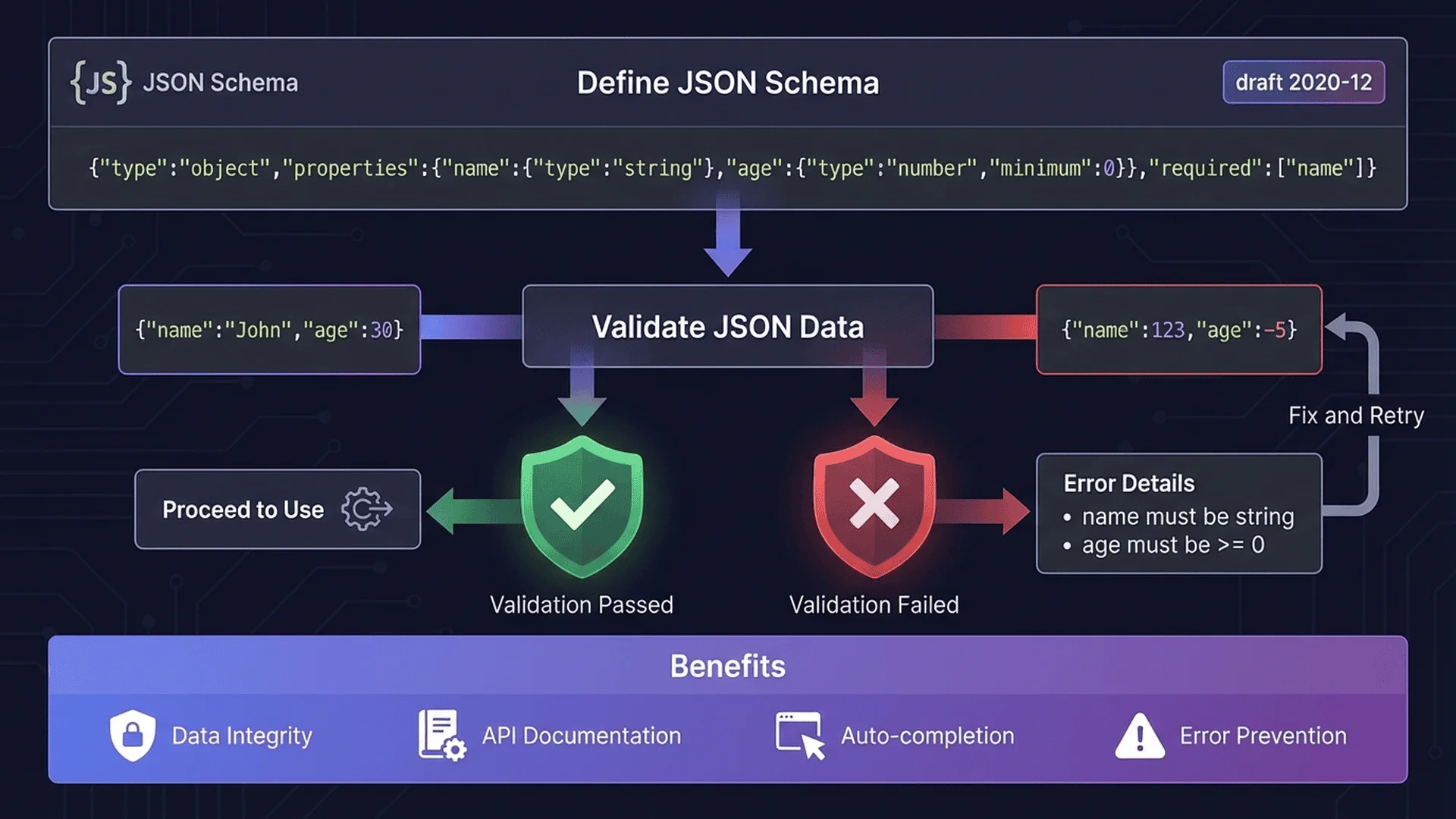
語法結構深入解析
基本語法規則
JSON 的語法建立在兩種結構之上:
1. 物件(Object)
物件是鍵值對的無序集合,用大括號 {} 包圍。
{
  "key1": "value1",
  "key2": "value2",
  "nested": {
    "subKey": "subValue"
  }
}
鍵名規則
- 必須是字串,且用雙引號包圍
- 可以包含任何 Unicode 字元(需轉義特殊字元)
- 同一物件內的鍵名應唯一(雖然規範未強制)
2. 陣列(Array)
陣列是值的有序集合,用方括號 [] 包圍。
[
  "string",
  123,
  true,
  null,
  {"key": "value"},
  [1, 2, 3]
]
空白字元處理
JSON 允許在以下位置插入空白字元(空格、Tab、換行、回車):
- 物件的
{和}前後 - 陣列的
[和]前後 :和,前後
// 壓縮格式(無空白)
{"name":"Alice","skills":["JS","Python"]}
// 格式化(有空白)
{
"name": "Alice",
"skills": [
"JS",
"Python"
]
}字元轉義
JSON 要求某些字元必須轉義:
| 字元 | 轉義形式 | 說明 |
|---|---|---|
| " | \" | 雙引號 |
| \ | \\ | 反斜線 |
| / | \/ | 斜線(可選) |
| 換行 | \n | Line feed |
| 回車 | \r | Carriage return |
| Tab | \t | Tab 字元 |
| 退格 | \b | Backspace |
| 換頁 | \f | Form feed |
| Unicode | \uXXXX | 任意 Unicode 字元 |
{
  "message": "第一行\n第二行",
  "quote": "他說:\"Hello\"",
  "unicode": "中文:\u4E2D\u6587"
}
資料類型完全指南
JSON 支援六種基本資料類型:
1. 字串(String)
- 必須用雙引號包圍(不可用單引號)
- 可以包含任何 Unicode 字元
- 空字串是有效的 JSON 字串
{
  "empty": "",
  "chinese": "中文字串",
  "emoji": "😀🎉",
  "escaped": "Line 1\nLine 2"
}
2. 數字(Number)
- 支援整數和浮點數
- 支援科學記號(e 或 E)
- 不支援 NaN、Infinity(會導致錯誤)
- 不支援前導零(0123 是非法的)
- 不支援十六進制(0xFF 是非法的)
{
  "integer": 42,
  "negative": -273,
  "decimal": 3.14159,
  "scientific": 6.022e23,
  "zero": 0
}
⚠️ 數字精度問題
JSON 規範未定義數字的精度限制,但大多數實作使用 IEEE 754 雙精度浮點數。這意味著:
- 整數安全範圍:-(2^53 - 1) 到 (2^53 - 1)
- 超出範圍可能失去精度
- 處理大數字時考慮使用字串
3. 布林值(Boolean)
只有兩個值:true 和 false(必須小寫)。
{
  "isActive": true,
  "isDeleted": false
}
4. Null
表示空值,必須小寫。
{
  "deletedAt": null,
  "optional": null
}
5. 物件(Object)
鍵值對的集合,可以巢狀嵌套。
{
  "user": {
    "profile": {
      "name": "Alice",
      "settings": {
        "theme": "dark"
      }
    }
  }
}
6. 陣列(Array)
值的有序列表,可以包含不同類型。
{
  "mixed": [1, "two", true, null, {}, []],
  "matrix": [[1, 2], [3, 4]],
  "empty": []
}
解析與序列化
JavaScript 中的 JSON
解析(Parsing)
將 JSON 字串轉換為 JavaScript 物件:
const jsonString = '{"name":"Alice","age":25}';

// 基本解析
const obj = JSON.parse(jsonString);
console.log(obj.name);  // "Alice"

// 使用 reviver 函數進行自訂轉換
const dateStr = '{"created":"2025-01-27T10:00:00Z"}';
const objWithDate = JSON.parse(dateStr, (key, value) => {
    if (key === 'created') {
        return new Date(value);
    }
    return value;
});
console.log(objWithDate.created instanceof Date);  // true

// 錯誤處理
try {
    const invalid = JSON.parse('{invalid}');
} catch (error) {
    console.error('解析錯誤:', error.message);
    // 解析錯誤: Unexpected token i in JSON at position 1
}
序列化(Serialization)
將 JavaScript 物件轉換為 JSON 字串:
const obj = {
    name: 'Alice',
    age: 25,
    active: true
};

// 基本序列化
const json = JSON.stringify(obj);
console.log(json);
// {"name":"Alice","age":25,"active":true}

// 美化輸出(縮排 2 個空格)
const pretty = JSON.stringify(obj, null, 2);
console.log(pretty);
/*
{
  "name": "Alice",
  "age": 25,
  "active": true
}
*/

// 使用 replacer 函數過濾屬性
const filtered = JSON.stringify(obj, ['name', 'age']);
console.log(filtered);
// {"name":"Alice","age":25}

// 使用 replacer 函數自訂轉換
const custom = JSON.stringify(obj, (key, value) => {
    if (typeof value === 'string') {
        return value.toUpperCase();
    }
    return value;
});
console.log(custom);
// {"name":"ALICE","age":25,"active":true}
特殊值的處理
const obj = {
    func: function() {},          // 函數
    undef: undefined,             // undefined
    symbol: Symbol('test'),       // Symbol
    date: new Date(),             // Date
    regex: /test/,                // RegExp
    number: 42,
    nan: NaN,
    infinity: Infinity
};

console.log(JSON.stringify(obj));
// {"date":"2025-01-27T10:00:00.000Z","number":42,"nan":null,"infinity":null}

// 觀察:
// - 函數被忽略
// - undefined 被忽略
// - Symbol 被忽略
// - Date 轉為 ISO 字串
// - RegExp 轉為空物件 {}
// - NaN 和 Infinity 轉為 null
效能優化技巧
1. 減少序列化開銷
// ❌ 不好:重複序列化
for (let i = 0; i < 1000; i++) {
    const json = JSON.stringify(largeObject);
    sendToServer(json);
}

// ✅ 好:快取序列化結果
const json = JSON.stringify(largeObject);
for (let i = 0; i < 1000; i++) {
    sendToServer(json);
}
2. 使用串流處理大型 JSON
// Node.js 串流解析(使用 JSONStream)
const fs = require('fs');
const JSONStream = require('JSONStream');

fs.createReadStream('large.json')
  .pipe(JSONStream.parse('users.*'))
  .on('data', user => {
      // 逐筆處理,記憶體效率高
      processUser(user);
  });
3. 壓縮 JSON 資料
// 使用 gzip 壓縮
const zlib = require('zlib');
const json = JSON.stringify(largeObject);

zlib.gzip(json, (err, compressed) => {
    console.log(`原始大小: ${json.length}`);
    console.log(`壓縮後: ${compressed.length}`);
    console.log(`壓縮率: ${(1 - compressed.length / json.length) * 100}%`);
});
4. 選擇性序列化
// 只序列化需要的欄位
class User {
    constructor(name, age, password) {
        this.name = name;
        this.age = age;
        this.password = password;  // 敏感資料
    }

    toJSON() {
        // 自訂序列化行為
        return {
            name: this.name,
            age: this.age
            // password 被排除
        };
    }
}

const user = new User('Alice', 25, 'secret123');
console.log(JSON.stringify(user));
// {"name":"Alice","age":25}
安全性考量
1. JSON 注入攻擊
不要直接將使用者輸入嵌入 JSON 字串:
// ❌ 危險:直接字串拼接
const userInput = '","admin":true,"hack":"';
const json = `{"name":"${userInput}","role":"user"}`;
// 結果: {"name":"","admin":true,"hack":"","role":"user"}

// ✅ 安全:使用 JSON.stringify
const safeJson = JSON.stringify({
    name: userInput,
    role: 'user'
});
2. 原型污染(Prototype Pollution)
// ❌ 危險:直接使用解析結果
const malicious = '{"__proto__":{"isAdmin":true}}';
const obj = JSON.parse(malicious);
// 可能污染 Object.prototype

// ✅ 安全:使用 Object.create(null)
function safeParse(jsonString) {
    const obj = JSON.parse(jsonString);
    return Object.assign(Object.create(null), obj);
}
3. DoS 攻擊防範
// 限制 JSON 大小
function parseWithLimit(jsonString, maxSize = 1024 * 1024) {
    if (jsonString.length > maxSize) {
        throw new Error('JSON 超過大小限制');
    }
    return JSON.parse(jsonString);
}

// 限制巢狀深度
function checkDepth(obj, maxDepth = 10, currentDepth = 0) {
    if (currentDepth > maxDepth) {
        throw new Error('JSON 巢狀過深');
    }

    if (typeof obj === 'object' && obj !== null) {
        for (const key in obj) {
            checkDepth(obj[key], maxDepth, currentDepth + 1);
        }
    }
}
4. 敏感資料處理
- 不要在 JSON 中儲存密碼或 API 金鑰
- 使用 HTTPS 傳輸 JSON 資料
- 實作 toJSON() 過濾敏感欄位
- 記錄時脫敏處理
最佳實踐建議
1. 命名規範
{
  // ✅ 推薦:使用 camelCase
  "firstName": "Alice",
  "phoneNumber": "+886-123-456-789",

  // ⚠️ 可接受:使用 snake_case(視團隊規範)
  "first_name": "Bob",
  "phone_number": "+886-987-654-321",

  // ❌ 避免:混用不同風格
  "FirstName": "Charlie",
  "phone-number": "+886-555-666-777"
}
2. 版本控制
{
  "version": "1.0",
  "data": {
    // API 回應資料
  }
}
3. 錯誤處理
{
  "success": false,
  "error": {
    "code": "INVALID_INPUT",
    "message": "使用者名稱不能為空",
    "details": {
      "field": "username",
      "constraint": "required"
    }
  }
}
4. 分頁回應
{
  "data": [...],
  "pagination": {
    "page": 1,
    "pageSize": 20,
    "total": 100,
    "totalPages": 5
  }
}
5. 時間戳格式
{
  // ✅ 推薦:ISO 8601 格式
  "createdAt": "2025-01-27T10:00:00Z",
  "updatedAt": "2025-01-27T15:30:00+08:00",

  // ⚠️ 可接受:Unix 時間戳(秒)
  "timestamp": 1706342400,

  // ❌ 避免:自訂格式
  "date": "2025/01/27 10:00:00"
}
總結
JSON 作為現代 Web 開發的標準資料格式,其簡潔性和靈活性使其成為 API 設計的首選。掌握 JSON 的技術細節,不僅能提升開發效率,還能避免常見的安全漏洞和效能問題。
核心要點回顧
- ✅ JSON 語法簡單但有嚴格規範(雙引號、無註解、無尾隨逗號)
- ✅ 六種資料類型:字串、數字、布林、null、物件、陣列
- ✅ 使用
JSON.parse()和JSON.stringify()處理資料 - ✅ 注意數字精度、特殊字元轉義、安全性問題
- ✅ 採用一致的命名規範和資料結構設計