Base64 編碼完全指南:原理、應用與最佳實踐Complete Guide to Base64 Encoding: Principles, Applications & Best Practices
📅發布日期:2025-01-27Published: 2025-01-27
⏱️閱讀時間:約 10 分鐘Reading time: ~10 min
🏷️分類:技術博客Category: Tech Blog
Base64 是一種廣泛使用的二進位至文字編碼方案(binary-to-text encoding),將任意二進位資料轉換為 64 個可列印 ASCII 字元。它不是加密演算法,而是編碼方式,主要用於在只支援文字的傳輸環境中傳輸二進位資料。本文將深入探討 Base64 的編碼原理、歷史背景、變體格式、實際應用和最佳實踐,幫助開發者全面理解這項基礎而重要的技術。Base64 is a widely used binary-to-text encoding scheme that converts arbitrary binary data into 64 printable ASCII characters. It's not an encryption algorithm but an encoding method, primarily used for transmitting binary data in text-only environments. This article will explore Base64's encoding principles, historical background, variant formats, practical applications, and best practices, helping developers fully understand this fundamental and important technology.
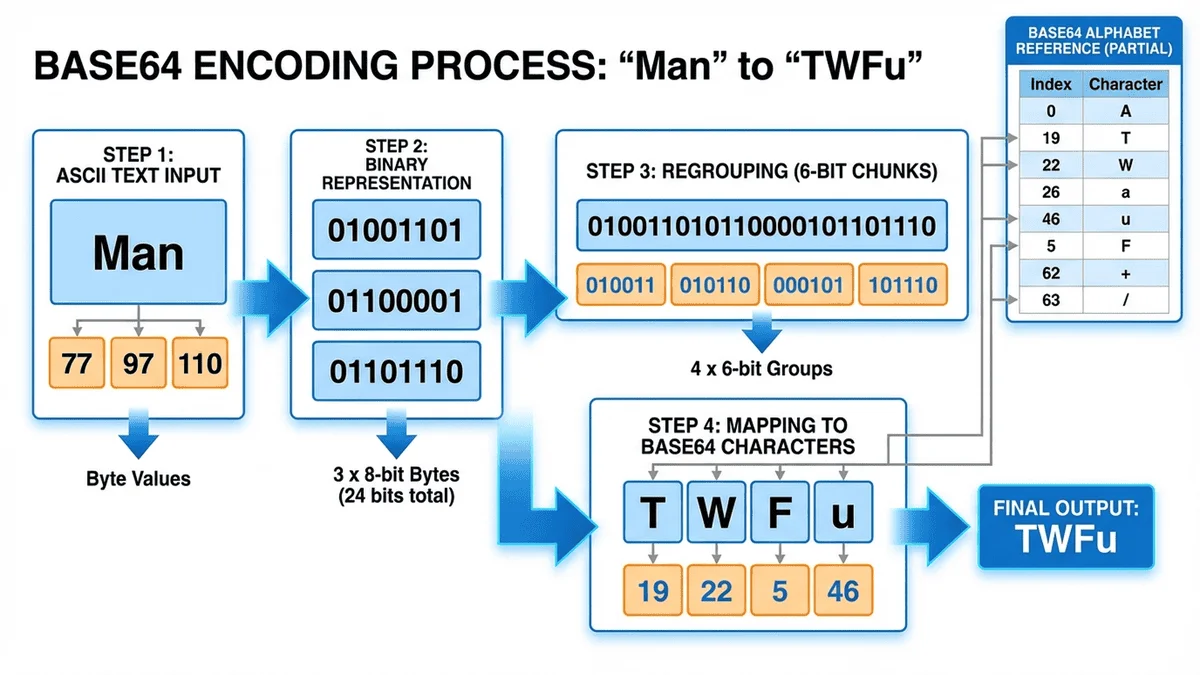
Base64編碼步驟流程圖
📚 什麼是 Base64?📚 What is Base64?
定義與歷史Definition and History
Base64 編碼最早出現在 1987 年的 RFC 989(Privacy Enhanced Mail,PEM)中,用於在電子郵件系統中傳輸二進位附件。由於早期電子郵件協定(SMTP)只支援 7-bit ASCII 文字,無法直接傳輸圖片、音訊等二進位檔案,因此需要將二進位資料編碼為純文字格式。Base64 encoding first appeared in RFC 989 (Privacy Enhanced Mail, PEM) in 1987, used for transmitting binary attachments in email systems. Since early email protocols (SMTP) only supported 7-bit ASCII text and couldn't directly transmit binary files like images or audio, binary data needed to be encoded into plain text format.
Base64 的名稱來自其使用的 64 個可列印字元(A-Z、a-z、0-9、+、/),這些字元在所有主流字元集(ASCII、EBCDIC)中都有一致的編碼,確保跨平台相容性。The name Base64 comes from its use of 64 printable characters (A-Z, a-z, 0-9, +, /), which have consistent encoding across all major character sets (ASCII, EBCDIC), ensuring cross-platform compatibility.
Base64 字元集Base64 Character Set
標準 Base64 使用以下 64 個字元:Standard Base64 uses the following 64 characters:
填充字元 = 用於確保編碼結果長度為 4 的倍數,不屬於 64 個資料字元之一。The padding character = ensures the encoded result length is a multiple of 4 and is not one of the 64 data characters.
Data URI實際應用範例截圖
⚙️ Base64 編碼原理⚙️ Base64 Encoding Principles
編碼過程詳解Detailed Encoding Process
Base64 編碼的核心原理是將每 3 個 bytes(24 bits)的二進位資料分割為 4 組,每組 6 bits,然後將每組 6 bits 對應到 Base64 字元表中的一個字元。The core principle of Base64 encoding is to divide every 3 bytes (24 bits) of binary data into 4 groups of 6 bits each, then map each 6-bit group to a character in the Base64 character table.
步驟 1:轉換為二進位Step 1: Convert to Binary
將原始資料的每個 byte 轉換為 8-bit 二進位表示。例如:Convert each byte of the original data to 8-bit binary representation. For example:
將每組的十進位值對應到 Base64 字元表:Map each group's decimal value to the Base64 character table:
19 → T
22 → W
5  → F
46 → u

結果: "TWFu"Result: "TWFu"
填充機制(Padding)Padding Mechanism
當原始資料的 byte 數不是 3 的倍數時,需要使用填充字元 = 補齊至 4 的倍數:When the number of bytes in the original data is not a multiple of 3, padding character = is used to fill to a multiple of 4:
原始 BytesOriginal Bytes
二進位 BitsBinary Bits
Base64 字元數Base64 Characters
填充Padding
範例Example
3 bytes
24 bits
4 字元4 chars
無需填充No padding
"Man" → "TWFu"
2 bytes
16 bits
3 字元3 chars
加 1 個 =Add 1 =
"Ma" → "TWE="
1 byte
8 bits
2 字元2 chars
加 2 個 =Add 2 =
"M" → "TQ=="
檔案大小變化File Size Change
Base64 編碼會使資料量增加約 33%(準確來說是 4/3 倍):Base64 encoding increases data size by approximately 33% (precisely 4/3 times):
⚠️ 效能考量:Base64 編碼會增加 33% 的資料傳輸量和儲存空間,對於大檔案或高流量應用,需要權衡編碼便利性和效能成本。考慮使用壓縮演算法(如 gzip)配合 Base64 可以減少總體大小。⚠️ Performance Consideration: Base64 encoding increases data transfer and storage by 33%. For large files or high-traffic applications, you need to weigh encoding convenience against performance costs. Consider using compression algorithms (like gzip) with Base64 to reduce overall size.
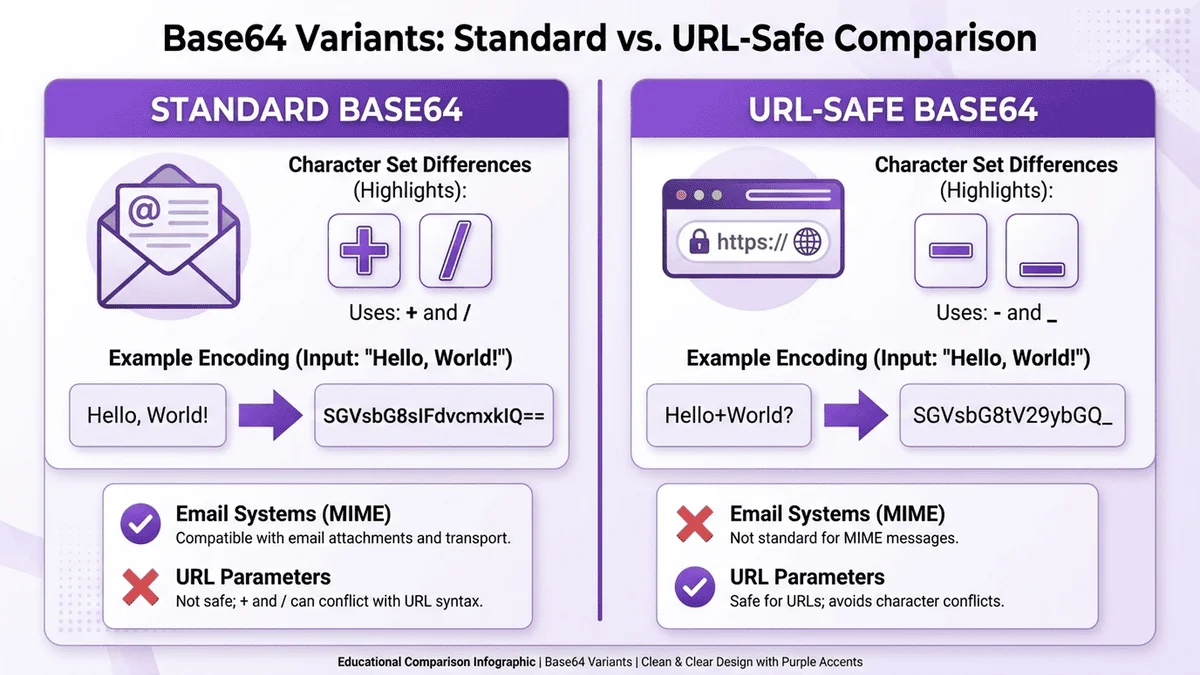
標準Base64與URL安全Base64比較圖
🔀 Base64 變體格式🔀 Base64 Variant Formats
1. 標準 Base64(RFC 4648)1. Standard Base64 (RFC 4648)
最常用的版本,定義於 RFC 4648,使用 A-Za-z0-9+/ 字元集,帶填充 =。The most commonly used version, defined in RFC 4648, uses the A-Za-z0-9+/ character set with = padding.
2. URL Safe Base642. URL Safe Base64
為了在 URL 和檔案名稱中安全使用,將 + 和 / 替換為 - 和 _,並移除填充 =:For safe use in URLs and filenames, + and / are replaced with - and _, and the = padding is removed:
字元Character
標準 Base64Standard Base64
URL Safe Base64
說明Description
第 62 字元62nd character
+
-
避免 URL 編碼(+ → %2B)Avoid URL encoding (+ → %2B)
第 63 字元63rd character
/
_
避免路徑分隔符衝突Avoid path separator conflict
填充Padding
=
省略Omitted
減少長度、避免特殊字元處理Reduce length, avoid special character handling
3. MIME Base643. MIME Base64
用於電子郵件附件(MIME),每 76 個字元插入一個換行符號(\r\n),確保相容性。Used for email attachments (MIME), inserts a line break (\r\n) every 76 characters to ensure compatibility.
4. UTF-74. UTF-7
一種已棄用的 Unicode 編碼方式,使用修改版 Base64 表示非 ASCII 字元。現已被 UTF-8 取代。A deprecated Unicode encoding method that uses a modified Base64 to represent non-ASCII characters. Now replaced by UTF-8.
🌐 Base64 常見應用🌐 Common Base64 Applications
1. Data URI(資料 URI)1. Data URI
直接在 HTML/CSS 中嵌入小型資源(圖片、字型、圖示),減少 HTTP 請求次數:Embed small resources (images, fonts, icons) directly in HTML/CSS to reduce HTTP requests:
<!-- HTML 嵌入圖片 --><!-- Embed image in HTML -->
<img src="data:image/png;base64,iVBORw0KGgoAAAANSUhEUgAAAAUA..." alt="Logo">

/* CSS 背景圖 *//* CSS background image */
.icon {
    background-image: url('data:image/svg+xml;base64,PHN2ZyB3aWR0aD0iMT...');
}
優點:減少 HTTP 請求、避免 CORS 問題、資源與 HTML 一起快取 缺點:HTML/CSS 檔案變大、無法獨立快取圖片、不適合大型資源(>10KB)Pros: Fewer HTTP requests, avoids CORS issues, resources cached with HTML Cons: Larger HTML/CSS files, images can't be cached separately, not suitable for large resources (>10KB)
2. 電子郵件附件(MIME)2. Email Attachments (MIME)
SMTP 協定只支援 7-bit ASCII,Base64 用於編碼二進位附件(圖片、PDF、影片):The SMTP protocol only supports 7-bit ASCII, so Base64 is used to encode binary attachments (images, PDFs, videos):
RESTful API 使用 JSON 格式時,無法直接傳輸二進位資料,需用 Base64 編碼:When RESTful APIs use JSON format, binary data cannot be transmitted directly and needs Base64 encoding:
將使用者名稱和密碼編碼為 Base64 放入 HTTP 標頭:Encode username and password as Base64 and put them in the HTTP header:
Authorization: Basic dXNlcm5hbWU6cGFzc3dvcmQ=
(解碼為 "username:password")(decodes to "username:password")
⚠️ 安全警告:Base64 編碼≠加密!編碼後的資料可被輕易解碼。HTTP Basic Authentication 必須搭配 HTTPS 使用,否則帳密會以明文傳輸(Base64 可輕易反向)。⚠️ Security Warning: Base64 encoding ≠ encryption! Encoded data can be easily decoded. HTTP Basic Authentication must be used with HTTPS, otherwise credentials will be transmitted in plain text (Base64 is easily reversible).
5. JWT(JSON Web Token)5. JWT (JSON Web Token)
JWT 使用 URL Safe Base64 編碼 Header、Payload 和 Signature:JWT uses URL Safe Base64 to encode Header, Payload, and Signature:
🛡️ 安全性考量與最佳實踐🛡️ Security Considerations & Best Practices
Base64 不是加密Base64 is Not Encryption
最常見的誤解是將 Base64 當作加密手段。實際上:The most common misconception is treating Base64 as an encryption method. In reality:
編碼 ≠ 加密:Base64 是可逆的編碼方式,任何人都能解碼Encoding ≠ Encryption: Base64 is a reversible encoding scheme; anyone can decode it
無安全保護:不提供機密性、完整性或身份驗證No Security Protection: Provides no confidentiality, integrity, or authentication
不適合敏感資料:密碼、金鑰、個資應使用真正的加密演算法(AES、RSA)Not Suitable for Sensitive Data: Passwords, keys, and personal data should use proper encryption algorithms (AES, RSA)
電子郵件附件 → 使用 MIME Base64(帶換行符號)Email attachments → Use MIME Base64 (with line breaks)
JSON API、JWT → 使用 URL Safe Base64(無填充)JSON APIs, JWT → Use URL Safe Base64 (no padding)
一般用途 → 使用標準 Base64General purpose → Use standard Base64
2. 注意檔案大小2. Mind the File Size
小於 5KB 的資源適合用 Data URI 嵌入 HTMLResources under 5KB are suitable for embedding as Data URIs in HTML
大於 10KB 的資源應獨立儲存並使用 CDNResources over 10KB should be stored separately and served via CDN
考慮配合 gzip 壓縮減少傳輸量Consider using gzip compression to reduce transfer size
3. 處理 UTF-8 字元3. Handle UTF-8 Characters
JavaScript 的 btoa() 只支援 Latin-1,中文需先用 encodeURIComponent() 處理JavaScript's btoa() only supports Latin-1; Chinese text needs encodeURIComponent() preprocessing
Python 和 PHP 預設支援 UTF-8,無需額外處理Python and PHP support UTF-8 by default, no additional handling needed
4. 驗證輸入資料4. Validate Input Data
解碼前驗證字串格式(只包含 Base64 合法字元)Validate string format before decoding (only valid Base64 characters)
處理解碼異常(非法字元、格式錯誤)Handle decoding exceptions (illegal characters, format errors)
限制輸入長度,防止記憶體耗盡攻擊Limit input length to prevent memory exhaustion attacks
💡 效能優化:對於大量小檔案(圖示、小圖片),可考慮將多個檔案合併為一個 Sprite Sheet,再用 Data URI 嵌入,減少 HTTP 請求次數並提升載入速度。💡 Performance Tip: For many small files (icons, small images), consider combining multiple files into a single Sprite Sheet and embedding it as a Data URI to reduce HTTP requests and improve loading speed.
📊 Base64 vs 其他編碼方式📊 Base64 vs Other Encoding Methods
✅ 人類可讀 ❌ 檔案大一倍✅ Human readable ❌ Double the file size
Base85
85
+25%
Git, PDF
✅ 更高效率 ❌ 支援度較低✅ More efficient ❌ Limited support
🎯 總結🎯 Summary
Base64 是網路世界中不可或缺的基礎技術,雖然會增加約 33% 的資料量,但提供了在純文字環境中傳輸二進位資料的可靠方法。理解其編碼原理和適用場景,能幫助開發者做出正確的技術選擇:Base64 is an indispensable foundational technology in the web world. Although it increases data size by about 33%, it provides a reliable method for transmitting binary data in text-only environments. Understanding its encoding principles and use cases helps developers make the right technical choices:
Data URI:適合小型資源(<5KB)嵌入 HTML/CSSData URI: Suitable for embedding small resources (<5KB) in HTML/CSS
API 傳輸:JSON 無法直接傳輸二進位時的標準方案API Transmission: Standard solution when JSON cannot transmit binary directly
電子郵件:MIME 編碼附件的必要技術Email: Essential technology for MIME encoding attachments
JWT/Token:URL Safe Base64 用於身份驗證JWT/Token: URL Safe Base64 for authentication
記住:Base64 是編碼,不是加密。敏感資料必須先加密再編碼,或直接使用 HTTPS 等安全傳輸協定。Remember: Base64 is encoding, not encryption. Sensitive data must be encrypted before encoding, or use secure transport protocols like HTTPS directly.
🚀 立即試用 Base64 編碼器🚀 Try Base64 Encoder Now
免費線上 Base64 編碼/解碼工具,支援文字、檔案上傳、URL Safe 模式。100% 本地處理,保護隱私安全!Free online Base64 encode/decode tool, supporting text, file upload, and URL Safe mode. 100% local processing for privacy protection!
免費線上 Base64 編碼器Free Online Base64 Encoder - 立即開始使用我們的工具Start using our tool now
📝 更新紀錄:本文最後更新於 2025 年 1 月 27 日。如有任何問題或建議,歡迎聯繫我們。📝 Update Log: This article was last updated on January 27, 2025. If you have any questions or suggestions, feel free to contact us.