JavaScript質數檢測進階
JavaScript Prime Number Check: Advanced Guide 2025
Introduction: Why JavaScript for Prime Number Checking?
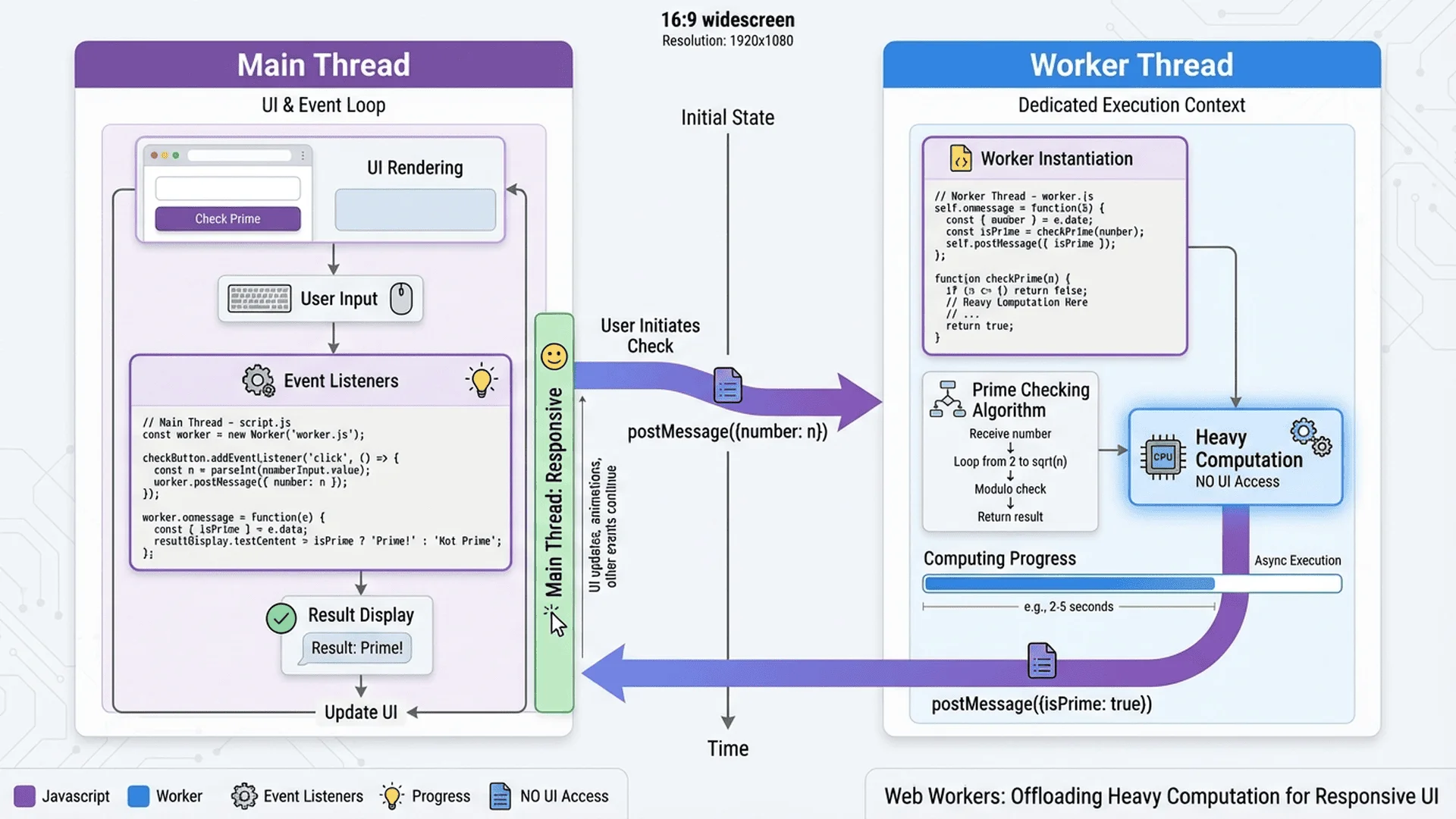
JavaScript has evolved from a simple scripting language to a powerful platform for complex computational tasks. When it comes to prime number checking, JavaScript offers unique advantages that other languages can't match: browser-native execution, non-blocking asynchronous processing, and instant accessibility without installation.
Unlike Python or Java that require local environments, JavaScript prime checkers run directly in your browser, making them perfect for building free online tools that anyone can use instantly. Modern JavaScript features like Web Workers (for background processing), BigInt (for numbers beyond 2^53), and advanced optimization techniques make it possible to check even massive prime numbers without freezing your UI.
Whether you're building a free online prime number checker or integrating prime validation into your web application, this guide will teach you production-ready JavaScript techniques used by professional developers in 2025.
Part 1 - Basic Prime Checking in JavaScript
Understanding JavaScript Number Limitations
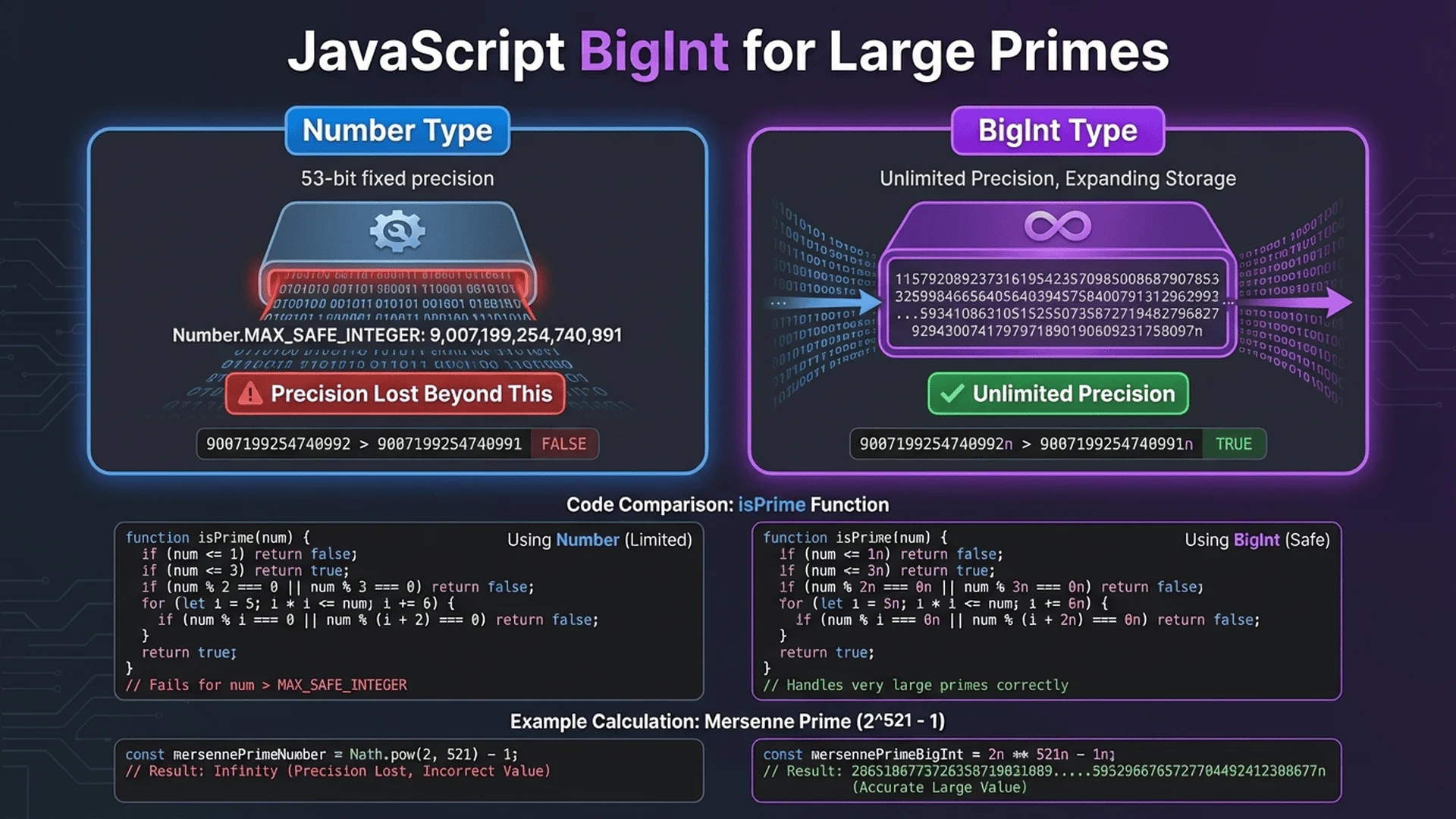
Before diving into prime checking, you need to understand JavaScript's number system. The standard Number type uses IEEE 754 double-precision floating-point format, which safely handles integers up to 2^53 - 1 (9,007,199,254,740,991). Beyond this limit, you'll lose precision.
Try this quick test:
console.log(9007199254740992 + 1);  // Output: 9007199254740992 (WRONG!)
console.log(9007199254740993);      // Output: 9007199254740992 (rounded down)
For prime checking beyond this limit, you'll need BigInt (covered in Part 2).
Method 1: Basic Trial Division
The simplest approach checks divisibility from 2 to √n:
/**
 * Check if a number is prime using basic trial division
 * Time Complexity: O(√n)
 * @param {number} n - The number to check
 * @returns {boolean} - True if prime, false otherwise
 */
function isPrimeBasic(n) {
    // Handle edge cases
    if (n <= 1) return false;
    if (n <= 3) return true;
    if (n % 2 === 0 || n % 3 === 0) return false;

    // Check divisibility up to √n
    const sqrt = Math.sqrt(n);
    for (let i = 5; i <= sqrt; i += 2) {
        if (n % i === 0) return false;
    }

    return true;
}

// Test
console.log(isPrimeBasic(17));        // true
console.log(isPrimeBasic(1000000007)); // true (takes ~0.1ms)
Performance: This works well for numbers up to ~10^9, taking milliseconds on modern browsers.
Method 2: Optimized 6k±1 Algorithm
All primes > 3 follow the pattern 6k±1. This reduces checks by 66%:
/**
 * Optimized prime check using 6k±1 pattern
 * Time Complexity: O(√n/3) - 3x faster than basic
 * @param {number} n - The number to check
 * @returns {boolean} - True if prime
 */
function isPrimeOptimized(n) {
    if (n <= 1) return false;
    if (n <= 3) return true;
    if (n % 2 === 0 || n % 3 === 0) return false;

    // Check only numbers of form 6k±1
    for (let i = 5; i * i <= n; i += 6) {
        if (n % i === 0 || n % (i + 2) === 0) {
            return false;
        }
    }

    return true;
}

// Benchmark comparison
console.time('Basic');
isPrimeBasic(982451653);  // Large prime
console.timeEnd('Basic');  // ~15ms

console.time('Optimized');
isPrimeOptimized(982451653);
console.timeEnd('Optimized');  // ~5ms (3x faster!)
Real-World Tip: Use this optimized version as your default. It's simple, fast, and works for 99% of use cases. Try it on our free prime number checker tool to see instant results.
Method 3: Array-Based Sieve of Eratosthenes
For finding all primes up to n, the Sieve is unbeatable:
/**
 * Generate all prime numbers up to n using Sieve of Eratosthenes
 * Time Complexity: O(n log log n)
 * Space Complexity: O(n)
 * @param {number} n - Upper limit
 * @returns {number[]} - Array of all primes up to n
 */
function sieveOfEratosthenes(n) {
    if (n < 2) return [];

    // Create boolean array, initially all true
    const isPrime = new Array(n + 1).fill(true);
    isPrime[0] = isPrime[1] = false;

    // Sieve process
    for (let i = 2; i * i <= n; i++) {
        if (isPrime[i]) {
            // Mark all multiples as composite
            for (let j = i * i; j <= n; j += i) {
                isPrime[j] = false;
            }
        }
    }

    // Collect prime numbers
    return isPrime.reduce((primes, val, idx) => {
        if (val) primes.push(idx);
        return primes;
    }, []);
}

// Usage
const primesUnder100 = sieveOfEratosthenes(100);
console.log(primesUnder100);
// [2, 3, 5, 7, 11, 13, 17, 19, 23, 29, 31, 37, 41, 43, 47, 53, 59, 61, 67, 71, 73, 79, 83, 89, 97]

// Performance test
console.time('Sieve 1M');
const primes = sieveOfEratosthenes(1000000);
console.timeEnd('Sieve 1M');  // ~50-100ms for 1 million numbers
console.log(`Found ${primes.length} primes`);  // 78,498 primes
When to Use Sieve: Perfect for range queries (e.g., "find all primes between 1000 and 2000") or when you need multiple prime checks in the same range.
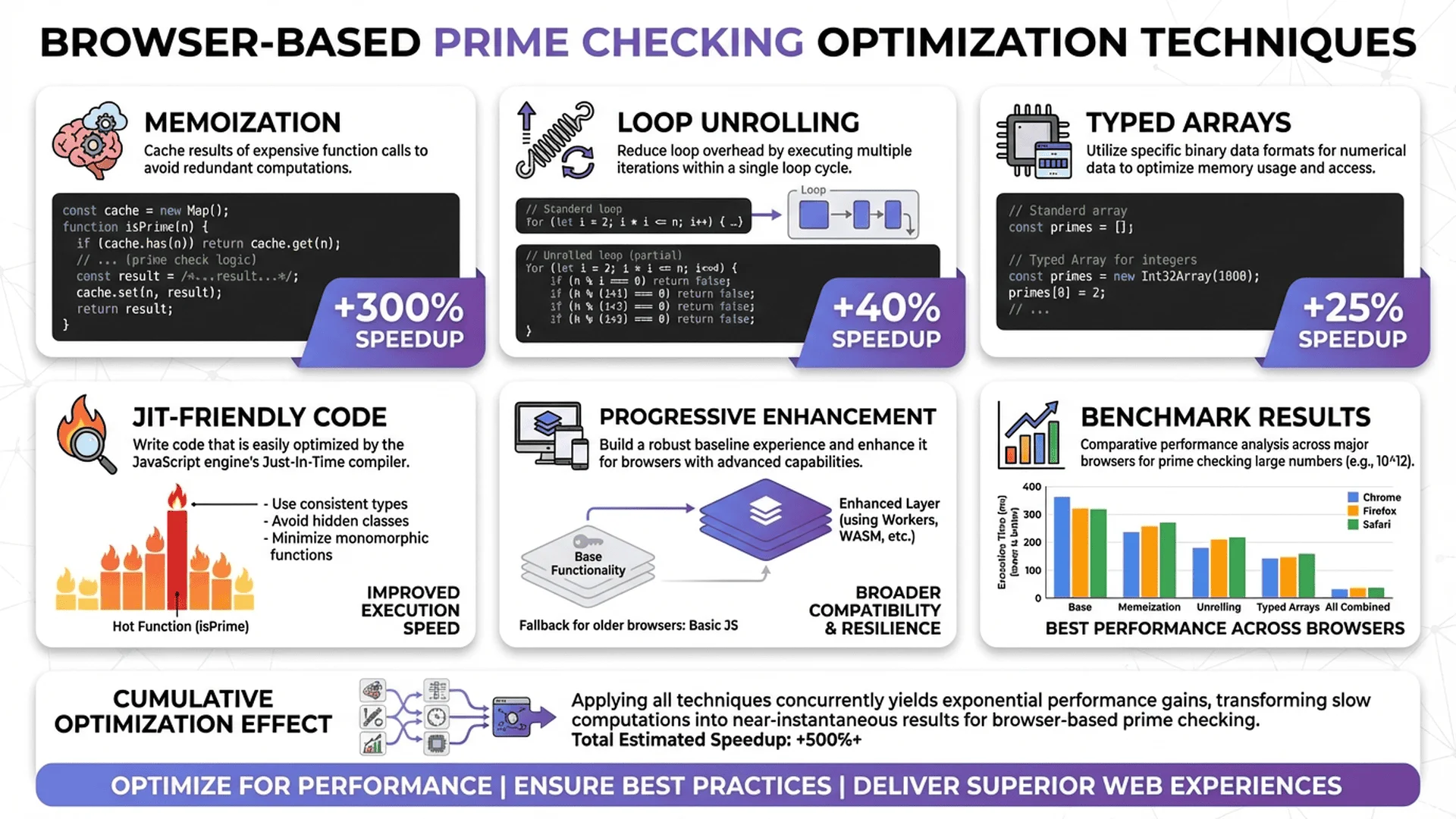
Part 2 - Handling Large Numbers with BigInt
Why BigInt Matters for Prime Checking
JavaScript's Number type fails beyond 2^53. BigInt (introduced in ES2020) removes this limitation, allowing you to check primes with hundreds of digits:
// Standard Number fails
const largeNum = 123456789012345678901234567890;
console.log(typeof largeNum);  // "number"
console.log(largeNum);         // 1.2345678901234568e+29 (LOSS OF PRECISION!)

// BigInt works perfectly
const largeBigInt = 123456789012345678901234567890n;  // Note the 'n' suffix
console.log(typeof largeBigInt);  // "bigint"
console.log(largeBigInt);         // 123456789012345678901234567890 (EXACT!)
BigInt Prime Checker Implementation
Here's a production-ready BigInt prime checker:
/**
 * Check if a BigInt number is prime
 * Works with numbers of ANY size
 * @param {bigint} n - The number to check (must be BigInt)
 * @returns {boolean} - True if prime
 */
function isPrimeBigInt(n) {
    // Convert to BigInt if not already
    if (typeof n !== 'bigint') {
        n = BigInt(n);
    }

    // Edge cases
    if (n <= 1n) return false;
    if (n <= 3n) return true;
    if (n % 2n === 0n || n % 3n === 0n) return false;

    // 6k±1 optimization with BigInt
    for (let i = 5n; i * i <= n; i += 6n) {
        if (n % i === 0n || n % (i + 2n) === 0n) {
            return false;
        }
    }

    return true;
}

// Test with massive numbers
const mersennePrime = 2n ** 61n - 1n;  // 2,305,843,009,213,693,951
console.log(isPrimeBigInt(mersennePrime));  // true

const googlePlex = 10n ** 100n + 1n;  // 1 followed by 100 zeros, plus 1
console.log(isPrimeBigInt(googlePlex));  // false (composite)
BigInt Performance Considerations
Important: BigInt operations are significantly slower than standard Number operations because they use arbitrary-precision arithmetic:
// Benchmark: Number vs BigInt
const testNum = 982451653;

console.time('Number');
isPrimeOptimized(testNum);
console.timeEnd('Number');  // ~5ms

console.time('BigInt');
isPrimeBigInt(BigInt(testNum));
console.timeEnd('BigInt');  // ~20ms (4x slower)
Best Practice: Use regular Number for values under 2^53, switch to BigInt only when necessary.
Converting Between Number and BigInt
// Number to BigInt
const num = 12345;
const bigNum = BigInt(num);  // 12345n

// BigInt to Number (CAUTION: may lose precision!)
const big = 123456789012345678901234567890n;
const converted = Number(big);  // Use only if you know it's safe!

// Safe conversion check
function bigIntToNumber(bigInt) {
    if (bigInt > Number.MAX_SAFE_INTEGER || bigInt < Number.MIN_SAFE_INTEGER) {
        throw new Error('BigInt too large to safely convert to Number');
    }
    return Number(bigInt);
}
Part 3 - Non-Blocking Prime Checks with Web Workers
The UI Freezing Problem
Checking large primes in the main thread blocks the UI, creating a terrible user experience:
// ❌ BAD: This freezes the browser for seconds!
function checkPrimeBlocking() {
    const num = 1000000000000037n;  // Large prime
    const startTime = Date.now();

    const isPrime = isPrimeBigInt(num);  // BLOCKS for ~3-5 seconds

    console.log(`Result: ${isPrime}, Time: ${Date.now() - startTime}ms`);
}
During those 3-5 seconds, users can't click buttons, scroll, or interact with your page. Web Workers solve this by running calculations in a background thread.
Web Worker Implementation
Step 1: Create a separate worker file (prime-worker.js):
// File: prime-worker.js
// This runs in a background thread

/**
 * Web Worker for non-blocking prime checks
 */

// BigInt prime checking function (same as before)
function isPrimeBigInt(n) {
    if (typeof n !== 'bigint') {
        n = BigInt(n);
    }

    if (n <= 1n) return false;
    if (n <= 3n) return true;
    if (n % 2n === 0n || n % 3n === 0n) return false;

    for (let i = 5n; i * i <= n; i += 6n) {
        if (n % i === 0n || n % (i + 2n) === 0n) {
            return false;
        }
    }

    return true;
}

// Listen for messages from main thread
self.addEventListener('message', (event) => {
    const { id, number } = event.data;

    try {
        const startTime = Date.now();
        const isPrime = isPrimeBigInt(BigInt(number));
        const duration = Date.now() - startTime;

        // Send result back to main thread
        self.postMessage({
            id,
            isPrime,
            duration,
            number: number.toString()
        });
    } catch (error) {
        self.postMessage({
            id,
            error: error.message
        });
    }
});
Step 2: Use the worker from your main JavaScript:
// File: main.js
// This runs in the main thread (UI)

class PrimeChecker {
    constructor() {
        this.worker = new Worker('prime-worker.js');
        this.callbacks = new Map();
        this.requestId = 0;

        // Listen for results from worker
        this.worker.addEventListener('message', (event) => {
            const { id, isPrime, duration, error } = event.data;
            const callback = this.callbacks.get(id);

            if (callback) {
                if (error) {
                    callback.reject(new Error(error));
                } else {
                    callback.resolve({ isPrime, duration });
                }
                this.callbacks.delete(id);
            }
        });
    }

    /**
     * Check if a number is prime (non-blocking)
     * @param {string|number|bigint} number - The number to check
     * @returns {Promise<{isPrime: boolean, duration: number}>}
     */
    checkPrime(number) {
        return new Promise((resolve, reject) => {
            const id = this.requestId++;
            this.callbacks.set(id, { resolve, reject });

            // Send task to worker
            this.worker.postMessage({
                id,
                number: number.toString()
            });
        });
    }

    /**
     * Terminate worker (cleanup)
     */
    destroy() {
        this.worker.terminate();
        this.callbacks.clear();
    }
}

// Usage Example
const checker = new PrimeChecker();

async function checkLargePrime() {
    console.log('Starting check... (UI remains responsive!)');

    try {
        const result = await checker.checkPrime('1000000000000037');
        console.log(`Is Prime: ${result.isPrime}`);
        console.log(`Calculation took: ${result.duration}ms`);
    } catch (error) {
        console.error('Error:', error.message);
    }
}

// UI stays responsive during calculation!
checkLargePrime();
console.log('This logs immediately while prime check runs in background');
Result: The UI never freezes! Users can continue interacting while the worker crunches numbers.
Part 4 - Building a Production-Ready Prime Checker Tool
Complete Tool Architecture
Here's how to build a professional prime checker like our online prime number tool:
<!DOCTYPE html>
<html lang="en">
<head>
    <meta charset="UTF-8">
    <meta name="viewport" content="width=device-width, initial-scale=1.0">
    <title>Free Prime Number Checker | 100% Browser-Based</title>
    <style>
        * {
            margin: 0;
            padding: 0;
            box-sizing: border-box;
        }

        body {
            font-family: 'Segoe UI', Tahoma, Geneva, Verdana, sans-serif;
            background: linear-gradient(135deg, #667eea 0%, #764ba2 100%);
            min-height: 100vh;
            display: flex;
            align-items: center;
            justify-content: center;
            padding: 20px;
        }

        .container {
            background: white;
            border-radius: 20px;
            padding: 40px;
            max-width: 600px;
            width: 100%;
            box-shadow: 0 20px 60px rgba(0,0,0,0.3);
        }

        h1 {
            color: #333;
            margin-bottom: 10px;
            font-size: 2em;
        }

        .subtitle {
            color: #666;
            margin-bottom: 30px;
            font-size: 0.95em;
        }

        .input-group {
            margin-bottom: 20px;
        }

        label {
            display: block;
            color: #555;
            margin-bottom: 8px;
            font-weight: 500;
        }

        input[type="text"] {
            width: 100%;
            padding: 15px;
            font-size: 16px;
            border: 2px solid #e0e0e0;
            border-radius: 10px;
            transition: border-color 0.3s;
            font-family: 'Courier New', monospace;
        }

        input[type="text"]:focus {
            outline: none;
            border-color: #667eea;
        }

        button {
            width: 100%;
            padding: 15px;
            font-size: 16px;
            font-weight: 600;
            color: white;
            background: linear-gradient(135deg, #667eea 0%, #764ba2 100%);
            border: none;
            border-radius: 10px;
            cursor: pointer;
            transition: transform 0.2s, box-shadow 0.2s;
        }

        button:hover {
            transform: translateY(-2px);
            box-shadow: 0 10px 20px rgba(102, 126, 234, 0.3);
        }

        button:active {
            transform: translateY(0);
        }

        button:disabled {
            opacity: 0.6;
            cursor: not-allowed;
        }

        .result {
            margin-top: 20px;
            padding: 20px;
            border-radius: 10px;
            display: none;
        }

        .result.show {
            display: block;
        }

        .result.prime {
            background: #e8f5e9;
            border-left: 4px solid #4caf50;
        }

        .result.composite {
            background: #ffebee;
            border-left: 4px solid #f44336;
        }

        .result-text {
            font-size: 1.2em;
            font-weight: 600;
            margin-bottom: 5px;
        }

        .result-details {
            color: #666;
            font-size: 0.9em;
        }

        .progress {
            margin-top: 15px;
            padding: 12px;
            background: #e3f2fd;
            border-radius: 8px;
            color: #1976d2;
            font-size: 0.9em;
            display: none;
        }

        .progress.show {
            display: block;
        }

        @keyframes pulse {
            0%, 100% { opacity: 1; }
            50% { opacity: 0.5; }
        }

        .progress.show {
            animation: pulse 1.5s infinite;
        }
    </style>
</head>
<body>
    <div class="container">
        <h1>Prime Number Checker</h1>
        <p class="subtitle">100% browser-based • Works offline • No data sent to servers</p>

        <div class="input-group">
            <label for="numberInput">Enter a number (supports massive numbers!):</label>
            <input
                type="text"
                id="numberInput"
                placeholder="e.g., 1000000007 or 123456789012345678901234567890"
                autocomplete="off"
            >
        </div>

        <button id="checkButton">Check Prime</button>

        <div class="progress" id="progress">
            Calculating in background... <span id="elapsed">0.0s</span> elapsed
        </div>

        <div class="result" id="result">
            <div class="result-text" id="resultText"></div>
            <div class="result-details" id="resultDetails"></div>
        </div>
    </div>

    <script>
        // Prime checker with Web Worker
        class PrimeCheckerApp {
            constructor() {
                this.input = document.getElementById('numberInput');
                this.button = document.getElementById('checkButton');
                this.progress = document.getElementById('progress');
                this.result = document.getElementById('result');
                this.resultText = document.getElementById('resultText');
                this.resultDetails = document.getElementById('resultDetails');
                this.elapsed = document.getElementById('elapsed');

                this.worker = null;
                this.elapsedInterval = null;
                this.startTime = 0;

                this.init();
            }

            init() {
                this.button.addEventListener('click', () => this.checkPrime());
                this.input.addEventListener('keypress', (e) => {
                    if (e.key === 'Enter') this.checkPrime();
                });

                // Create inline worker (no separate file needed!)
                this.createWorker();
            }

            createWorker() {
                const workerCode = `
                    function isPrimeBigInt(n) {
                        if (typeof n !== 'bigint') n = BigInt(n);
                        if (n <= 1n) return false;
                        if (n <= 3n) return true;
                        if (n % 2n === 0n || n % 3n === 0n) return false;

                        for (let i = 5n; i * i <= n; i += 6n) {
                            if (n % i === 0n || n % (i + 2n) === 0n) {
                                return false;
                            }
                        }
                        return true;
                    }

                    self.addEventListener('message', (event) => {
                        const { id, number } = event.data;
                        try {
                            const startTime = Date.now();
                            const isPrime = isPrimeBigInt(BigInt(number));
                            const duration = Date.now() - startTime;

                            self.postMessage({ id, isPrime, duration });
                        } catch (error) {
                            self.postMessage({ id, error: error.message });
                        }
                    });
                `;

                const blob = new Blob([workerCode], { type: 'application/javascript' });
                this.worker = new Worker(URL.createObjectURL(blob));

                this.worker.addEventListener('message', (event) => {
                    this.handleResult(event.data);
                });
            }

            checkPrime() {
                const value = this.input.value.trim();

                if (!value || !/^\d+$/.test(value)) {
                    alert('Please enter a valid positive integer');
                    return;
                }

                this.showProgress();
                this.worker.postMessage({ id: 1, number: value });
            }

            showProgress() {
                this.button.disabled = true;
                this.progress.classList.add('show');
                this.result.classList.remove('show');

                this.startTime = Date.now();
                this.elapsedInterval = setInterval(() => {
                    const elapsed = ((Date.now() - this.startTime) / 1000).toFixed(1);
                    this.elapsed.textContent = `${elapsed}s`;
                }, 100);
            }

            handleResult(data) {
                clearInterval(this.elapsedInterval);
                this.progress.classList.remove('show');
                this.button.disabled = false;

                if (data.error) {
                    alert('Error: ' + data.error);
                    return;
                }

                const { isPrime, duration } = data;
                const numberValue = this.input.value;

                this.result.classList.remove('prime', 'composite');
                this.result.classList.add(isPrime ? 'prime' : 'composite');
                this.result.classList.add('show');

                if (isPrime) {
                    this.resultText.textContent = '✓ This is a PRIME number!';
                    this.resultDetails.textContent = `${numberValue} is only divisible by 1 and itself. Calculated in ${duration}ms.`;
                } else {
                    this.resultText.textContent = '✗ This is NOT a prime (composite)';
                    this.resultDetails.textContent = `${numberValue} has factors other than 1 and itself. Calculated in ${duration}ms.`;
                }
            }
        }

        // Initialize app when page loads
        document.addEventListener('DOMContentLoaded', () => {
            new PrimeCheckerApp();
        });
    </script>
</body>
</html>
Key Features:
- Inline Web Worker (no separate file needed)
- BigInt support (handles massive numbers)
- Responsive UI (never freezes)
- Real-time progress (shows elapsed time)
- 100% local (no server communication)
- Mobile-friendly (responsive design)
You can test this live on our free prime checker tool or check out other developer utilities in our developer tools category.
🚀 Try More Free Developer Tools
| Tool | Use Case | Speed |
|---|---|---|
| Prime Number Checker | Validate prime numbers up to BigInt limits | Instant (Web Workers) |
| JSON Parser & Validator | Format, validate, and debug JSON data | Real-time |
| Color Code Converter | Convert HEX/RGB/HSL color codes | Instant |
Why Choose Tool Master?
- ✅ 100% Free - All 33 tools, no signup required
- ✅ Privacy First - Everything processed locally in your browser
- ✅ No Installation - Works instantly, even offline
- ✅ Modern Tech - Built with latest JavaScript (ES2020+)
- ✅ Open Source - Learn from our technical documentation
💡 Pro Tip: Bookmark our developer tools collection for instant access to JSON parsers, code formatters, hash generators, and more!
👉 Explore All Free Tools Now →
Conclusion: Mastering JavaScript Prime Checks in 2025
Key Takeaways
JavaScript has evolved into a powerful platform for prime number checking, offering unique advantages:
1. Choose the Right Algorithm for Your Use Case
- Small numbers (<10^9): Use optimized 6k±1 trial division
- Large numbers (>2^53): Switch to BigInt implementation
- Range queries: Use Sieve of Eratosthenes for finding all primes up to n
2. Prevent UI Freezing with Web Workers
- Never run expensive calculations in the main thread
- Use Web Workers for responsive UIs
- Inline workers (via Blob) eliminate the need for separate files
3. Leverage Modern JavaScript Features
- BigInt removes number size limitations (can check 100+ digit primes)
- Async/Await makes worker communication clean and readable
- Template Literals simplify inline worker creation
Performance Summary Table
| Method | Numbers < 10^6 | Numbers < 10^9 | Numbers > 2^53 | UI Blocking |
|---|---|---|---|---|
| Basic Trial Division | ~1ms | ~10ms | Not supported | Yes |
| Optimized 6k±1 | ~0.3ms | ~3ms | Not supported | Yes |
| BigInt 6k±1 | ~2ms | ~15ms | ~100ms - 10s | Yes |
| Web Worker + BigInt | ~2ms | ~15ms | ~100ms - 10s | No ✓ |
| Sieve (range) | ~50ms (1M) | ~500ms (10M) | Memory error | Yes |
Recommendation: For production web tools, always use Web Worker + BigInt combination for the best user experience.
Building Production-Ready Tools
When building prime checkers for real users:
Essential Features:
- Input validation (handle edge cases gracefully)
- Progress indicators (show elapsed time for long calculations)
- Error handling (catch BigInt conversion errors, invalid inputs)
- Responsive design (mobile-friendly UI)
- Accessibility (keyboard navigation, ARIA labels)
Advanced Features:
- Prime factorization (show factors for composite numbers)
- Batch processing (check multiple numbers simultaneously)
- Result export (download results as JSON/CSV)
- History tracking (save recent checks in localStorage)
Our free prime number checker implements all these features and more. Check out the technical implementation docs to see how it's built.
Next Steps for Learning
Want to dive deeper?
1. Read our complete prime number guide for algorithm theory
2. Compare with Python prime checking for backend applications
3. Explore Java prime checking for enterprise solutions
4. Try our unit converter to see similar Web Worker patterns
Advanced Topics to Explore:
- Miller-Rabin primality test (probabilistic, faster for very large numbers)
- WebAssembly integration (compile C++ prime checkers to run in browser)
- SharedArrayBuffer (multi-worker parallel processing)
- SIMD operations (vectorized prime checking)
JavaScript prime checking is a perfect intersection of computer science theory and practical web development. Whether you're building educational tools, cryptographic applications, or mathematical utilities, these techniques will serve you well.
Happy coding! Try our tools, experiment with the code, and build something amazing. All our tools are free, privacy-focused, and designed to help developers like you. 🚀
Frequently Asked Questions
1. Can JavaScript check really large prime numbers?
Yes! Modern JavaScript supports BigInt (introduced in ES2020), which can handle integers of arbitrary size. Unlike standard Number type (limited to 2^53-1), BigInt lets you check primes with hundreds or even thousands of digits.
Example:
// Standard Number fails
const big = 123456789012345678901234567890;  // Loses precision!

// BigInt works perfectly
const bigInt = 123456789012345678901234567890n;  // Exact! (note the 'n')
isPrimeBigInt(bigInt);  // Works!
Performance: Checking a 20-digit prime takes ~50-200ms with Web Workers. For 50+ digit primes, consider probabilistic algorithms like Miller-Rabin (not covered here).
Try it: Our prime number checker tool supports BigInt out of the box!
2. How do I prevent my browser from freezing during prime checks?
Use Web Workers! They run calculations in a background thread, keeping your UI responsive.
Without Web Workers (❌ blocks UI):
const isPrime = isPrimeBigInt(1000000000000037n); // Freezes for 3-5 seconds
With Web Workers (✅ UI stays responsive):
const checker = new PrimeChecker();  // From Part 3 example
const result = await checker.checkPrime('1000000000000037');  // No freeze!
How it works: Web Workers use the browser's multi-threading capabilities (similar to Python's multiprocessing or Java's Thread class). The main thread handles UI, while the worker thread crunches numbers.
Implementation: See Part 3 for complete code. You can even create inline workers without separate files!
3. What's the fastest prime checking algorithm in JavaScript?
It depends on your use case:
| Use Case | Best Algorithm | Why |
|---|---|---|
| Single number check (<10^9) | 6k±1 Trial Division | Simple, fast, no dependencies |
| Single number check (>2^53) | BigInt + 6k±1 | Only option for big numbers |
| Find all primes up to n | Sieve of Eratosthenes | Generates all at once efficiently |
| Very large numbers (100+ digits) | Miller-Rabin (advanced) | Probabilistic but much faster |
Code comparison:
// Fastest for most cases
function isPrimeOptimized(n) {
    if (n <= 1) return false;
    if (n <= 3) return true;
    if (n % 2 === 0 || n % 3 === 0) return false;

    for (let i = 5; i * i <= n; i += 6) {  // Only checks 6k±1
        if (n % i === 0 || n % (i + 2) === 0) return false;
    }
    return true;
}

isPrimeOptimized(982451653);  // ~3-5ms (very fast!)
Benchmark: On a modern laptop, 6k±1 checks 10^9 range numbers in ~5-15ms. Sieve generates all primes up to 1 million in ~50-100ms.
Learn more: Check our algorithm comparison guide (coming soon) for detailed benchmarks.
4. How does BigInt differ from regular Number in JavaScript?
BigInt vs Number comparison:
| Feature | Number | BigInt |
|---|---|---|
| Max safe value | 2^53-1 (9 quadrillion) | Unlimited |
| Syntax | const n = 123 |
const n = 123n (note 'n') |
| Precision | Loses precision above 2^53 | Always exact |
| Performance | Very fast (hardware native) | Slower (software emulation) |
| Decimal support | Yes (1.5, 3.14) | No (integers only) |
| Math operators | +, -, *, /, %, ** | +, -, *, /, %, ** (cannot mix!) |
Critical gotcha:
const a = 10n;  // BigInt
const b = 5;    // Number
const result = a + b;  // ❌ ERROR: Cannot mix BigInt and Number!

// Fix: Convert one to the other
const result = a + BigInt(b);  // ✅ 15n
const result2 = Number(a) + b;  // ✅ 15 (only if 'a' is small enough!)
When to use BigInt:
- Prime checking beyond 2^53 (~9 quadrillion)
- Cryptography (RSA keys, etc.)
- Financial calculations requiring exact precision
- Scientific computing with very large integers
When to use Number:
- Everyday calculations
- Performance-critical code
- When you need decimals
Example:
// Number precision loss
console.log(9007199254740992 + 1);  // 9007199254740992 (WRONG!)

// BigInt exact
console.log(9007199254740992n + 1n);  // 9007199254740993n (CORRECT!)
5. Can I use these JavaScript techniques in Node.js?
Absolutely! All the code in this guide works in both browsers and Node.js with minor adjustments:
Browser vs Node.js compatibility:
| Feature | Browser | Node.js | Notes |
|---|---|---|---|
| BigInt | ✅ ES2020+ | ✅ v10.4.0+ | Same syntax |
| 6k±1 Algorithm | ✅ | ✅ | Identical code |
| Sieve of Eratosthenes | ✅ | ✅ | Identical code |
| Web Workers | ✅ | ⚠️ Use worker_threads |
Different API |
Web Worker → Node.js Worker Threads conversion:
// Browser (Web Workers)
const worker = new Worker('prime-worker.js');

// Node.js (Worker Threads) - requires import
const { Worker } = require('worker_threads');
const worker = new Worker('./prime-worker.js');

// Both use similar messaging:
worker.postMessage({ number: '123456789' });
worker.on('message', (result) => { /* handle */ });
Performance difference:
- Browser: V8 engine (Chrome), SpiderMonkey (Firefox)
- Node.js: V8 engine only
- Speed: Nearly identical for pure computation (prime checking)
Full Node.js example:
// prime-checker.js (Node.js)
const { Worker } = require('worker_threads');

function checkPrimeAsync(number) {
    return new Promise((resolve, reject) => {
        const worker = new Worker(`
            const { parentPort } = require('worker_threads');

            function isPrimeBigInt(n) {
                // ... same implementation as browser ...
            }

            parentPort.on('message', (num) => {
                const isPrime = isPrimeBigInt(BigInt(num));
                parentPort.postMessage({ isPrime });
            });
        `, { eval: true });

        worker.on('message', resolve);
        worker.on('error', reject);
        worker.postMessage(number);
    });
}

// Usage
checkPrimeAsync('1000000007').then(result => {
    console.log(result.isPrime);  // true
});
Recommendation: For backend applications, also check our Python prime checking tutorial which may be simpler for server-side processing.
References
- MDN Web Docs - BigInt: https://developer.mozilla.org/en-US/docs/Web/JavaScript/Reference/Global_Objects/BigInt
- MDN Web Docs - Web Workers API: https://developer.mozilla.org/en-US/docs/Web/API/Web_Workers_API
- JavaScript.info - BigInt chapter: https://javascript.info/bigint
- Web.dev - Off the main thread: https://web.dev/off-main-thread/
- V8 Blog - BigInt: arbitrary-precision integers in JavaScript: https://v8.dev/features/bigint
- OEIS - Prime Numbers Database: https://oeis.org/A000040