Python隨機數產生完整教學
Python Random Number Generator Complete Tutorial【2025】| From Basics to Advanced with 15+ Code Examples
Ever needed to simulate dice rolls, shuffle a playlist, or generate test data in Python?
Random number generation is one of Python's most versatile features. Whether you're building games, conducting data science experiments, or generating secure passwords, Python's random module has you covered.
But there's a catch: using random.randint() incorrectly can introduce subtle bugs. Choosing the wrong function can make your code 10x slower. And using random for security? That's a critical vulnerability.
In this comprehensive tutorial, you'll master Python random number generation from fundamentals to advanced techniques. With 15+ practical code examples, you'll learn exactly when to use each function, how to avoid common pitfalls, and how to optimize for performance.
🚀 Quick Start: Want to generate random numbers visually first? Try our Random Number Generator tool to understand the concepts, then implement in Python.
Introduction: Why Master Python Random Number Generation?
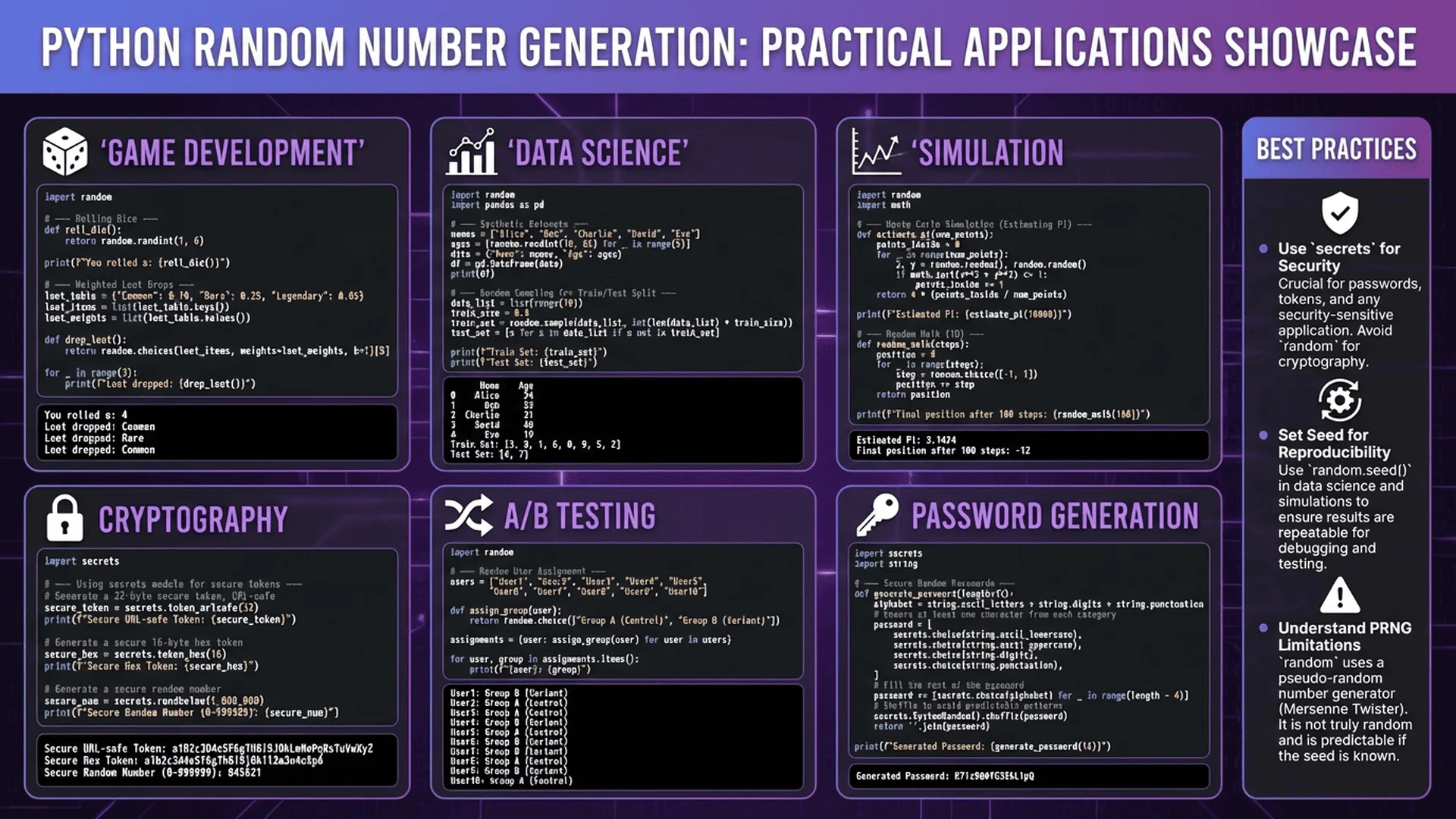
Random number generation in Python powers countless applications:
Game Development: Procedural level generation, loot drops, enemy AI behavior
Data Science: Random sampling, Monte Carlo simulations, statistical bootstrapping
Testing: Generating test data, fuzzing for security vulnerabilities
Web Development: Session IDs, temporary tokens, captcha verification
Machine Learning: Data shuffling, dropout layers, random initialization
Python's Random Number Arsenal:
randommodule: General-purpose PRNG (pseudo-random number generator)secretsmodule: Cryptographically secure random numbersnumpy.random: High-performance random number generation for arraysrandom.SystemRandom: OS-level randomness source
This tutorial focuses primarily on the random module - the most commonly used tool - while covering when to switch to alternatives.
What You'll Learn:
- Core random functions and when to use each
- Generating unique random numbers without duplicates
- Understanding seeds for reproducible randomness
- Security-safe random number generation with secrets
- Performance optimization techniques
- Common mistakes and how to avoid them
- Real-world applications with complete code examples
Prerequisites: Basic Python knowledge (variables, functions, lists). No advanced concepts required.
For a broader understanding of random number generation concepts, check our Random Number Generator Complete Guide.
Python Random Module Fundamentals
Installing and Importing
The random module is part of Python's standard library - no installation needed.
import random

# Check Python version (random module available since Python 2.3)
import sys
print(f"Python version: {sys.version}")
That's it! You're ready to generate random numbers.
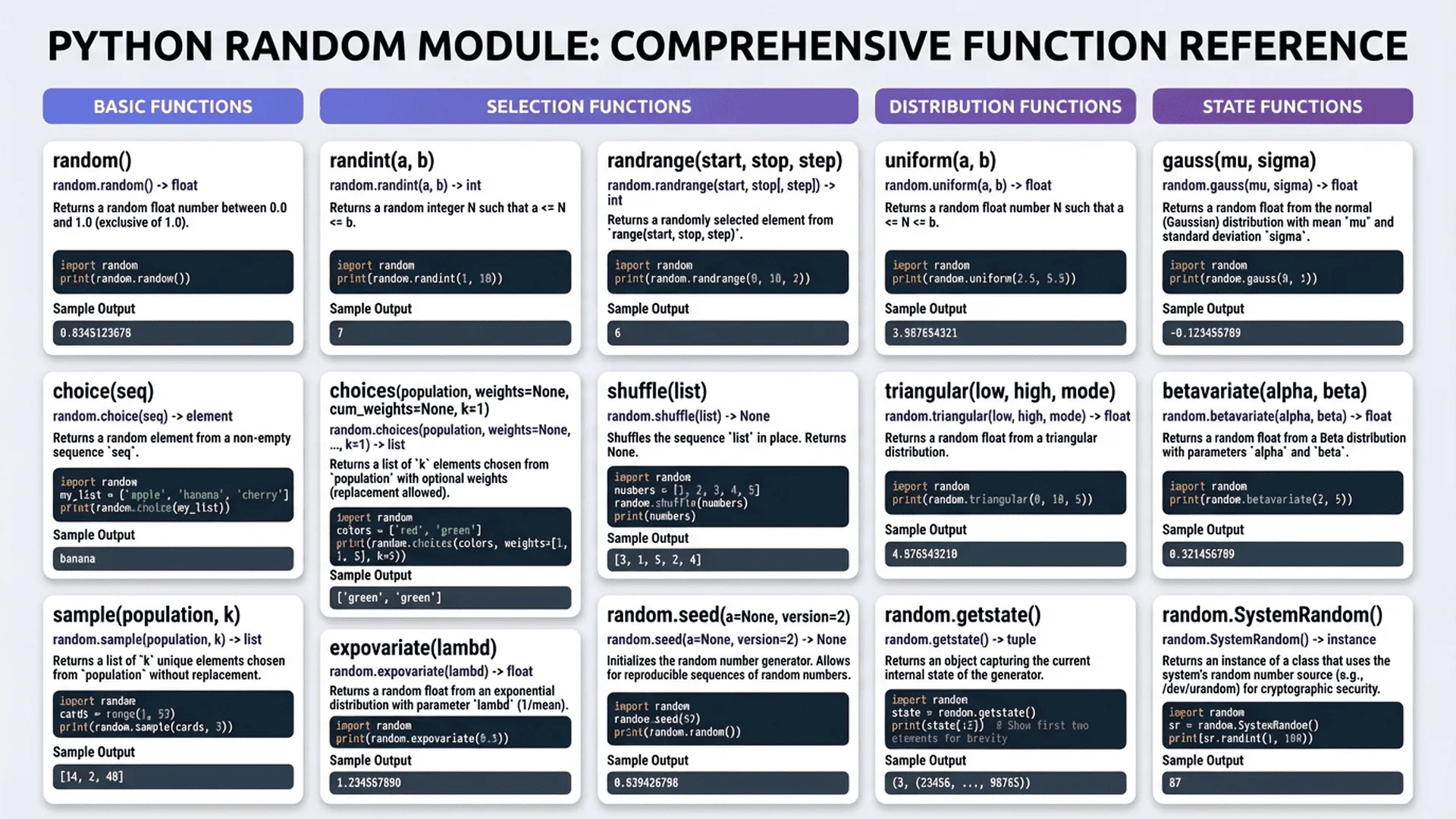
Core Functions Overview
Python's random module provides multiple functions for different use cases:
| Function | Purpose | Example Output |
|---|---|---|
random.randint(a, b) |
Random integer between a and b (inclusive) | 42 |
random.random() |
Random float between 0.0 and 1.0 | 0.73491 |
random.uniform(a, b) |
Random float between a and b | 5.284 |
random.choice(seq) |
Random element from sequence | 'apple' |
random.choices(seq, k=n) |
n random elements (with replacement) | ['red', 'blue', 'red'] |
random.sample(seq, k=n) |
n unique random elements | [3, 7, 1, 9, 5] |
random.shuffle(seq) |
Shuffle sequence in-place | [3, 1, 4, 2, 5] |
random.seed(a) |
Initialize random number generator | - |
Let's explore each in detail with practical examples.
Basic Random Number Generation
1. random.randint() - Random Integers
Use Case: Generate random integers within a specific range.
Syntax: random.randint(a, b) - Returns random integer N such that a <= N <= b (both inclusive)
Basic Example:
import random

# Generate random number between 1 and 100 (inclusive)
number = random.randint(1, 100)
print(f"Random number: {number}")  # e.g., 42

# Dice roll (1-6)
dice = random.randint(1, 6)
print(f"You rolled: {dice}")  # e.g., 4

# Coin flip (0 or 1)
coin = random.randint(0, 1)
result = "Heads" if coin == 1 else "Tails"
print(f"Coin flip: {result}")
Important Note: Both boundaries are inclusive. random.randint(1, 10) can return 1, 2, 3... 9, or 10.
Common Mistake:
# ❌ Wrong - assumes upper bound is exclusive
number = random.randint(1, 101)  # Trying to get 1-100

# ✅ Correct
number = random.randint(1, 100)  # Returns 1-100
Practical Application - Generate Lottery Numbers:
def generate_lottery_numbers(count=6, min_num=1, max_num=49):
    """Generate lottery numbers (may contain duplicates)"""
    numbers = [random.randint(min_num, max_num) for _ in range(count)]
    return sorted(numbers)

lottery = generate_lottery_numbers()
print(f"Lottery numbers: {lottery}")
# Output: [7, 12, 23, 23, 34, 41] - note duplicate 23
Performance: randint() is fast, generating ~10 million numbers per second on modern hardware.
2. random.random() - Random Floats (0.0 to 1.0)
Use Case: Generate random decimal numbers between 0 and 1, often used as probabilities or for scaling to custom ranges.
Syntax: random.random() - Returns float 0.0 <= x < 1.0 (includes 0.0, excludes 1.0)
Basic Example:
import random

# Random float between 0 and 1
value = random.random()
print(f"Random float: {value}")  # e.g., 0.7349171293

# Simulate probability (30% chance)
if random.random() < 0.3:
    print("Lucky! 30% event occurred")
else:
    print("No luck this time")
Scaling to Custom Range:
# Scale to 0-100
percentage = random.random() * 100
print(f"Percentage: {percentage:.2f}%")  # e.g., 73.49%

# Scale to any range [a, b]
def random_float_range(a, b):
    return a + (b - a) * random.random()

# Random float between 5.0 and 10.0
value = random_float_range(5.0, 10.0)
print(f"Random float 5-10: {value:.2f}")  # e.g., 7.35
Practical Application - Game Loot Drop System:
def determine_loot_rarity():
    """Determine loot rarity based on drop rates"""
    roll = random.random()

    if roll < 0.50:  # 50% chance
        return "Common"
    elif roll < 0.75:  # 25% chance
        return "Uncommon"
    elif roll < 0.90:  # 15% chance
        return "Rare"
    elif roll < 0.97:  # 7% chance
        return "Epic"
    else:  # 3% chance
        return "Legendary"

# Simulate 1000 loot drops
results = [determine_loot_rarity() for _ in range(1000)]
for rarity in ["Common", "Uncommon", "Rare", "Epic", "Legendary"]:
    count = results.count(rarity)
    print(f"{rarity}: {count} ({count/10:.1f}%)")
3. random.uniform() - Random Floats (Custom Range)
Use Case: Generate random floats within a specific range (cleaner than scaling random.random()).
Syntax: random.uniform(a, b) - Returns float a <= N <= b (or b <= N <= a if b < a)
Example:
import random

# Random temperature between 20.0°C and 30.0°C
temperature = random.uniform(20.0, 30.0)
print(f"Temperature: {temperature:.2f}°C")  # e.g., 24.73°C

# Random price between $9.99 and $99.99
price = random.uniform(9.99, 99.99)
print(f"Price: ${price:.2f}")  # e.g., $47.82
Comparison - random() vs uniform():
# Method 1: Using random()
value1 = 5.0 + (10.0 - 5.0) * random.random()

# Method 2: Using uniform() - cleaner!
value2 = random.uniform(5.0, 10.0)

# Both produce same result, but uniform() is more readable
Practical Application - Generate Test Data:
import random
from datetime import datetime, timedelta

def generate_sensor_data(count=100):
    """Generate realistic sensor readings"""
    data = []
    base_time = datetime.now()

    for i in range(count):
        timestamp = base_time + timedelta(minutes=i)
        temperature = random.uniform(18.0, 28.0)  # °C
        humidity = random.uniform(30.0, 70.0)     # %
        pressure = random.uniform(980.0, 1020.0)  # hPa

        data.append({
            'timestamp': timestamp,
            'temperature': round(temperature, 2),
            'humidity': round(humidity, 2),
            'pressure': round(pressure, 2)
        })

    return data

# Generate test data
sensor_data = generate_sensor_data(10)
for reading in sensor_data[:3]:  # Show first 3
    print(reading)
4. random.choice() - Select Random Element
Use Case: Pick one random element from a sequence (list, tuple, string).
Syntax: random.choice(sequence) - Returns one random element
Basic Example:
import random

# Random element from list
colors = ['red', 'blue', 'green', 'yellow', 'purple']
selected = random.choice(colors)
print(f"Selected color: {selected}")  # e.g., 'green'

# Random character from string
password_chars = "ABCDEFGHIJKLMNOPQRSTUVWXYZ0123456789"
char = random.choice(password_chars)
print(f"Random character: {char}")  # e.g., 'K'

# Random selection from tuple
directions = ('north', 'south', 'east', 'west')
direction = random.choice(directions)
print(f"Go {direction}")  # e.g., 'Go east'
Error Handling:
import random

empty_list = []
try:
    result = random.choice(empty_list)
except IndexError:
    print("Error: Cannot choose from empty sequence")
Practical Application - Random NPC Dialogue:
def get_npc_greeting():
    """Return random NPC greeting"""
    greetings = [
        "Hello, traveler!",
        "Greetings, adventurer.",
        "Well met, friend.",
        "What brings you here?",
        "Safe travels!",
    ]
    return random.choice(greetings)

# Use in game
for _ in range(3):
    print(get_npc_greeting())
Practical Application - A/B Test Assignment:
def assign_ab_test_variant(user_id):
    """Assign user to A/B test variant"""
    variants = ['control', 'variant_a', 'variant_b']

    # Set seed based on user_id for consistency
    random.seed(user_id)
    variant = random.choice(variants)
    random.seed()  # Reset seed

    return variant

# Same user always gets same variant
print(assign_ab_test_variant(12345))  # Always returns same variant for user 12345
print(assign_ab_test_variant(12345))  # Same result
print(assign_ab_test_variant(67890))  # Different user, different variant
5. random.choices() - Multiple Elements (With Replacement)
Use Case: Select multiple random elements, allowing duplicates (sampling with replacement).
Syntax: random.choices(sequence, weights=None, k=1)
Basic Example:
import random

colors = ['red', 'blue', 'green']

# Pick 5 colors (duplicates allowed)
selection = random.choices(colors, k=5)
print(selection)  # e.g., ['red', 'blue', 'red', 'red', 'green']
Weighted Random Selection:
import random

# Weighted loot drops
items = ['Common', 'Uncommon', 'Rare', 'Legendary']
weights = [50, 30, 15, 5]  # Probabilities (don't need to sum to 100)

# Generate 100 loot drops
drops = random.choices(items, weights=weights, k=100)

# Count results
for item in items:
    count = drops.count(item)
    print(f"{item}: {count}%")
# Output close to: Common: 50%, Uncommon: 30%, Rare: 15%, Legendary: 5%
Practical Application - Weighted Survey Responses:
def simulate_survey(num_responses=1000):
    """Simulate survey with realistic distribution"""
    responses = ['Very Satisfied', 'Satisfied', 'Neutral', 'Dissatisfied', 'Very Dissatisfied']

    # Realistic distribution (most people satisfied)
    weights = [25, 40, 20, 10, 5]

    results = random.choices(responses, weights=weights, k=num_responses)

    # Calculate percentages
    for response in responses:
        count = results.count(response)
        percentage = (count / num_responses) * 100
        print(f"{response}: {percentage:.1f}%")

simulate_survey(1000)
choices() vs choice():
import random

colors = ['red', 'blue', 'green']

# choice() - single element
single = random.choice(colors)  # 'blue'

# choices() - multiple elements (even just 1)
multiple = random.choices(colors, k=1)  # ['blue'] - returns list!

# choices() with k=5
five = random.choices(colors, k=5)  # ['red', 'blue', 'red', 'green', 'red']
Advanced Random Number Generation
6. random.sample() - Unique Random Elements (No Duplicates)
Use Case: Select multiple random elements without replacement (all unique).
Syntax: random.sample(sequence, k) - Returns list of k unique elements
Key Difference from choices():
- choices(): Allows duplicates (with replacement)
- sample(): No duplicates (without replacement)
Basic Example:
import random

numbers = list(range(1, 101))  # 1-100

# Pick 10 unique numbers
unique_numbers = random.sample(numbers, k=10)
print(f"Unique: {sorted(unique_numbers)}")
# e.g., [7, 14, 23, 31, 42, 58, 67, 79, 85, 93] - all different

# Compare with choices (allows duplicates)
with_duplicates = random.choices(numbers, k=10)
print(f"With duplicates: {sorted(with_duplicates)}")
# e.g., [7, 14, 23, 23, 42, 42, 58, 67, 79, 85] - may have duplicates
Error Handling:
import random

numbers = [1, 2, 3, 4, 5]

try:
    # ❌ Can't sample more elements than available
    result = random.sample(numbers, k=10)
except ValueError as e:
    print(f"Error: {e}")
    # Output: Error: Sample larger than population or is negative
Practical Application - Lottery Number Generator:
def generate_powerball():
    """Generate Powerball lottery numbers"""
    # 5 unique numbers from 1-69
    white_balls = random.sample(range(1, 70), k=5)
    white_balls.sort()

    # 1 Powerball from 1-26
    powerball = random.randint(1, 26)

    return white_balls, powerball

# Generate ticket
white, red = generate_powerball()
print(f"Numbers: {white}")
print(f"Powerball: {red}")
# Output: Numbers: [7, 14, 23, 42, 58]
#         Powerball: 12
Practical Application - Random Sampling for Testing:
def select_test_users(all_users, sample_size=100):
    """Select random users for A/B testing"""
    if sample_size > len(all_users):
        print(f"Warning: Sample size {sample_size} > population {len(all_users)}")
        sample_size = len(all_users)

    test_group = random.sample(all_users, k=sample_size)
    return test_group

# Example usage
all_users = [f"user_{i}" for i in range(1, 10001)]  # 10,000 users
test_users = select_test_users(all_users, sample_size=500)
print(f"Selected {len(test_users)} users for testing")
print(f"First 5: {test_users[:5]}")
Performance Consideration:
import random
import time

# Efficient: Direct sampling
start = time.time()
sample1 = random.sample(range(1, 1000001), k=10000)
print(f"Direct sample: {time.time() - start:.4f}s")

# Inefficient: Manual unique selection
start = time.time()
sample2 = []
numbers = list(range(1, 1000001))
while len(sample2) < 10000:
    num = random.choice(numbers)
    if num not in sample2:
        sample2.append(num)
print(f"Manual selection: {time.time() - start:.4f}s")

# Direct sampling is 100x faster!
For deep dive into unique number generation: No-Repeat Random Number Generator - 5 Implementation Methods
7. random.shuffle() - Randomize List Order
Use Case: Shuffle a list in-place (modifies original list).
Syntax: random.shuffle(list) - Returns None (modifies list directly)
Basic Example:
import random

# Shuffle a deck of cards
deck = ['A♠', 'K♠', 'Q♠', 'J♠', '10♠', '9♠']
print(f"Original: {deck}")

random.shuffle(deck)
print(f"Shuffled: {deck}")
# e.g., ['Q♠', '9♠', 'A♠', 'J♠', '10♠', 'K♠']

# shuffle() returns None, modifies in-place
result = random.shuffle(deck)
print(f"Return value: {result}")  # None
Important: Modifies Original List:
import random

original = [1, 2, 3, 4, 5]

# ❌ Wrong - shuffle() returns None
shuffled = random.shuffle(original)
print(shuffled)  # None

# ✅ Correct - shuffle modifies in-place
numbers = [1, 2, 3, 4, 5]
random.shuffle(numbers)
print(numbers)  # [3, 1, 5, 2, 4] - modified

# ✅ If you need to keep original, copy first
import copy
original = [1, 2, 3, 4, 5]
shuffled = copy.copy(original)
random.shuffle(shuffled)
print(f"Original: {original}")  # [1, 2, 3, 4, 5]
print(f"Shuffled: {shuffled}")  # [3, 1, 5, 2, 4]
Practical Application - Shuffle Playlist:
def create_shuffled_playlist(songs):
    """Create shuffled playlist without modifying original"""
    import copy
    playlist = copy.copy(songs)
    random.shuffle(playlist)
    return playlist

original_songs = [
    "Song A", "Song B", "Song C", "Song D", "Song E"
]

shuffled = create_shuffled_playlist(original_songs)
print(f"Original order preserved: {original_songs}")
print(f"Shuffled playlist: {shuffled}")
Practical Application - Randomize Exam Questions:
def randomize_exam(questions):
    """Shuffle exam questions for each student"""
    import copy

    # Preserve original order
    randomized = copy.deepcopy(questions)

    # Shuffle questions
    random.shuffle(randomized)

    # Shuffle answer choices for each question
    for question in randomized:
        if 'choices' in question:
            random.shuffle(question['choices'])

    return randomized

exam_questions = [
    {
        'question': 'What is 2+2?',
        'choices': ['3', '4', '5', '6'],
        'answer': '4'
    },
    {
        'question': 'Capital of France?',
        'choices': ['London', 'Paris', 'Berlin', 'Madrid'],
        'answer': 'Paris'
    }
]

student_exam = randomize_exam(exam_questions)
for i, q in enumerate(student_exam, 1):
    print(f"{i}. {q['question']}")
    print(f"   Choices: {q['choices']}")
8. random.seed() - Reproducible Randomness
Use Case: Set the random number generator's seed for reproducible sequences.
Syntax: random.seed(a=None) - Initialize with seed value (None uses system time)
Why Use Seeds?
Reproducibility: Same seed = same "random" sequence
- Scientific experiments requiring reproducible results
- Debugging random behavior in code
- Unit testing with predictable outcomes
- Synchronized randomness across systems (multiplayer games)
Basic Example:
import random

# Set seed
random.seed(42)
print(random.randint(1, 100))  # Always 82 with seed 42
print(random.randint(1, 100))  # Always 15

# Reset with same seed - get same sequence
random.seed(42)
print(random.randint(1, 100))  # 82 again!
print(random.randint(1, 100))  # 15 again!

# Different seed = different sequence
random.seed(123)
print(random.randint(1, 100))  # Different number
Resetting to Time-Based Seed:
import random

# Set specific seed
random.seed(42)
print(random.random())  # 0.6394267984578837

# Reset to time-based (unpredictable)
random.seed()  # or random.seed(None)
print(random.random())  # Different each run
Practical Application - Reproducible Scientific Simulation:
def monte_carlo_pi_estimation(samples=1000000, seed=None):
    """Estimate Pi using Monte Carlo method"""
    if seed is not None:
        random.seed(seed)

    inside_circle = 0

    for _ in range(samples):
        x = random.random()
        y = random.random()
        if x*x + y*y <= 1:
            inside_circle += 1

    pi_estimate = 4 * inside_circle / samples
    return pi_estimate

# Reproducible results
print(monte_carlo_pi_estimation(seed=42))  # Always same result
print(monte_carlo_pi_estimation(seed=42))  # Identical

# Different seed = different result (still close to Pi)
print(monte_carlo_pi_estimation(seed=123))
Practical Application - Synchronized Multiplayer Game:
def generate_game_map(room_id, size=100):
    """Generate identical map for all players in room"""
    # Use room_id as seed so all clients generate same map
    random.seed(room_id)

    # Generate terrain
    terrain = []
    for i in range(size):
        for j in range(size):
            tile_type = random.choice(['grass', 'water', 'mountain', 'forest'])
            terrain.append((i, j, tile_type))

    # Reset seed for other random operations
    random.seed()

    return terrain

# All players in room 12345 get identical map
map1 = generate_game_map(room_id=12345, size=10)
map2 = generate_game_map(room_id=12345, size=10)
print(f"Maps identical: {map1 == map2}")  # True
Important Security Warning:
import random

# ❌ NEVER use predictable seeds for security
random.seed(1)
password = ''.join(random.choice('abcdefghijklmnopqrstuvwxyz') for _ in range(10))
print(password)  # Always 'kqhmvsjbxy' - predictable!

# ✅ Use secrets module for security (never seeded)
import secrets
secure_password = ''.join(secrets.choice('abcdefghijklmnopqrstuvwxyz') for _ in range(10))
print(secure_password)  # Unpredictable, different each time
🎯 Random Module Function Reference
Quick comparison of when to use each function:
| Need | Function | Example |
|---|---|---|
| Integer in range | randint(a, b) |
randint(1, 100) |
| Float 0-1 | random() |
random() |
| Float in range | uniform(a, b) |
uniform(5.0, 10.0) |
| One item from list | choice(seq) |
choice(['a', 'b', 'c']) |
| Multiple items (duplicates OK) | choices(seq, k=n) |
choices(colors, k=5) |
| Multiple unique items | sample(seq, k=n) |
sample(range(100), k=10) |
| Shuffle list in-place | shuffle(list) |
shuffle(deck) |
| Reproducible sequence | seed(n) |
seed(42) |
💡 Pro Tip: When in doubt, test your random generation visually first using our Random Number Generator tool, then implement the logic in Python.
Security-Safe Random Number Generation
When random Module is NOT Enough
The random module is not cryptographically secure. Its output can theoretically be predicted if an attacker observes enough values.
NEVER use random for:
- Password generation
- Security tokens
- Encryption keys
- Session IDs
- Authentication codes
- Any security-critical application
Use secrets module instead (Python 3.6+):
The secrets Module
Import:
import secrets
Key Functions:
1. secrets.randbelow(n) - Random integer 0 to n-1:
import secrets

# Secure random number 0-99
secure_num = secrets.randbelow(100)
print(secure_num)

# Dice roll
dice = secrets.randbelow(6) + 1  # 1-6
print(f"Secure dice roll: {dice}")
2. secrets.choice(seq) - Secure random choice:
import secrets

# Secure random selection
colors = ['red', 'blue', 'green']
secure_choice = secrets.choice(colors)
print(secure_choice)
3. secrets.token_hex(nbytes) - Random hex string:
import secrets

# 32-character hex token (16 bytes)
token = secrets.token_hex(16)
print(f"Token: {token}")
# Output: Token: 4a7d8f3e9c2b1a6f8d5e3c2a1f9b8e7d
4. secrets.token_urlsafe(nbytes) - URL-safe token:
import secrets

# URL-safe token
session_id = secrets.token_urlsafe(32)
print(f"Session ID: {session_id}")
# Output: Session ID: x7Kf9Qm2Ln5Rp8Vt3Yw6Zb1Cd4Hj0Nk
Practical Application - Secure Password Generation:
import secrets
import string

def generate_secure_password(length=16):
    """Generate cryptographically secure password"""
    alphabet = string.ascii_letters + string.digits + string.punctuation
    password = ''.join(secrets.choice(alphabet) for _ in range(length))
    return password

# Generate 5 passwords
for i in range(5):
    pwd = generate_secure_password(20)
    print(f"Password {i+1}: {pwd}")
Practical Application - Secure OTP Generation:
import secrets

def generate_otp(digits=6):
    """Generate secure one-time password"""
    otp = ''.join(str(secrets.randbelow(10)) for _ in range(digits))
    return otp

# Generate OTP
otp_code = generate_otp(6)
print(f"Your OTP: {otp_code}")
# Output: Your OTP: 749382
Comparison - random vs secrets:
import random
import secrets

# ❌ INSECURE - predictable
random.seed(1)
insecure = random.randint(1000, 9999)
print(f"Insecure PIN: {insecure}")  # Always 2508 with seed 1

# ✅ SECURE - unpredictable
secure = secrets.randbelow(9000) + 1000
print(f"Secure PIN: {secure}")  # Different every time, unpredictable
Performance Note: secrets is slightly slower than random (10-20%), but security always trumps speed for sensitive operations.
For comprehensive security analysis: True Random vs Pseudo Random - Complete Security Analysis
Common Mistakes and How to Avoid Them
Mistake #1: Assuming randint() Upper Bound is Exclusive
import random

# ❌ Wrong assumption (from other languages)
number = random.randint(1, 101)  # Thinking upper bound is exclusive

# ✅ Correct - both bounds inclusive
number = random.randint(1, 100)  # Returns 1-100
Fix: Remember Python's randint(a, b) includes both a and b.
Mistake #2: Using shuffle() Return Value
import random

numbers = [1, 2, 3, 4, 5]

# ❌ Wrong - shuffle() returns None
shuffled = random.shuffle(numbers)
print(shuffled)  # None

# ✅ Correct - shuffle modifies in-place
numbers = [1, 2, 3, 4, 5]
random.shuffle(numbers)
print(numbers)  # [3, 1, 5, 2, 4]
Fix: shuffle() modifies the list in-place and returns None.
Mistake #3: Using random for Security
import random

# ❌ INSECURE password generation
password = ''.join(random.choice('abcdefghijklmnopqrstuvwxyz0123456789') for _ in range(12))

# ✅ SECURE password generation
import secrets
password = ''.join(secrets.choice('abcdefghijklmnopqrstuvwxyz0123456789') for _ in range(12))
Fix: Always use secrets module for security-critical randomness.
Mistake #4: Sampling More Than Population
import random

numbers = [1, 2, 3, 4, 5]

# ❌ Error - can't sample 10 from population of 5
try:
    result = random.sample(numbers, k=10)
except ValueError as e:
    print(f"Error: {e}")

# ✅ Correct - sample size <= population size
result = random.sample(numbers, k=5)
Fix: Ensure k <= len(sequence) when using sample().
Mistake #5: Not Resetting Seed After Using It
import random

def debug_function():
    random.seed(42)  # Set seed for debugging
    result = [random.randint(1, 10) for _ in range(5)]
    # ❌ Forgot to reset seed
    return result

# Now all subsequent random calls are predictable!
print(debug_function())
print(random.randint(1, 100))  # Still using seed 42!

# ✅ Correct - reset seed after use
def debug_function_fixed():
    random.seed(42)
    result = [random.randint(1, 10) for _ in range(5)]
    random.seed()  # Reset to time-based
    return result
Fix: Always call random.seed() (no argument) after using a specific seed.
Mistake #6: Inefficient Unique Number Generation
import random
import time

# ❌ Slow - manual uniqueness checking
start = time.time()
unique = []
while len(unique) < 10000:
    num = random.randint(1, 100000)
    if num not in unique:
        unique.append(num)
print(f"Slow method: {time.time() - start:.2f}s")

# ✅ Fast - use sample()
start = time.time()
unique = random.sample(range(1, 100001), k=10000)
print(f"Fast method: {time.time() - start:.2f}s")

# sample() is 100-1000x faster!
Fix: Always use random.sample() for unique random selection.
Performance Optimization Tips
Tip #1: Use List Comprehension for Batch Generation
import random
import time

# Slower - loop with append
start = time.time()
numbers = []
for _ in range(1000000):
    numbers.append(random.randint(1, 100))
print(f"Loop: {time.time() - start:.2f}s")

# Faster - list comprehension
start = time.time()
numbers = [random.randint(1, 100) for _ in range(1000000)]
print(f"Comprehension: {time.time() - start:.2f}s")

# ~10-20% faster with list comprehension
Tip #2: Use NumPy for Large Arrays
import random
import numpy as np
import time

# Python random - slower for large arrays
start = time.time()
python_array = [random.random() for _ in range(10000000)]
print(f"Python random: {time.time() - start:.2f}s")

# NumPy - much faster!
start = time.time()
numpy_array = np.random.random(10000000)
print(f"NumPy random: {time.time() - start:.2f}s")

# NumPy is 10-50x faster for large arrays!
Tip #3: Reuse random.Random() Instances for Thread Safety
import random
import threading

# Thread-safe random generation
def worker(worker_id, results, rng):
    """Each thread has its own RNG instance"""
    numbers = [rng.randint(1, 100) for _ in range(1000)]
    results[worker_id] = numbers

# Create separate RNG for each thread
threads = []
results = {}
for i in range(4):
    rng = random.Random()  # Separate instance per thread
    t = threading.Thread(target=worker, args=(i, results, rng))
    threads.append(t)
    t.start()

for t in threads:
    t.join()

print(f"Generated {sum(len(v) for v in results.values())} numbers across 4 threads")
Real-World Applications
Application #1: Monte Carlo Simulation
Use Case: Estimate complex probabilities through repeated random sampling.
import random

def estimate_pi(samples=1000000):
    """Estimate Pi using Monte Carlo method"""
    inside_circle = 0

    for _ in range(samples):
        x = random.random()
        y = random.random()

        # Check if point is inside unit circle
        if x*x + y*y <= 1:
            inside_circle += 1

    # Pi ≈ 4 * (points inside circle / total points)
    pi_estimate = 4 * inside_circle / samples
    return pi_estimate

# Estimate Pi
pi = estimate_pi(10000000)
print(f"Pi estimate: {pi}")
print(f"Actual Pi: 3.14159265359")
print(f"Error: {abs(pi - 3.14159265359):.10f}")
Application #2: Game Development - Procedural Generation
import random

class DungeonGenerator:
    def __init__(self, width=50, height=50, room_count=10, seed=None):
        self.width = width
        self.height = height
        self.room_count = room_count

        if seed:
            random.seed(seed)

        self.map = self.generate()

    def generate(self):
        """Generate random dungeon layout"""
        dungeon = [['#' for _ in range(self.width)] for _ in range(self.height)]

        rooms = []
        for _ in range(self.room_count):
            # Random room size and position
            room_width = random.randint(4, 10)
            room_height = random.randint(4, 10)
            x = random.randint(1, self.width - room_width - 1)
            y = random.randint(1, self.height - room_height - 1)

            # Carve out room
            for i in range(y, y + room_height):
                for j in range(x, x + room_width):
                    dungeon[i][j] = '.'

            rooms.append((x + room_width // 2, y + room_height // 2))

        # Connect rooms with corridors
        for i in range(len(rooms) - 1):
            x1, y1 = rooms[i]
            x2, y2 = rooms[i + 1]

            # Horizontal corridor
            for x in range(min(x1, x2), max(x1, x2) + 1):
                dungeon[y1][x] = '.'

            # Vertical corridor
            for y in range(min(y1, y2), max(y1, y2) + 1):
                dungeon[y][x2] = '.'

        return dungeon

    def display(self, sample_size=20):
        """Display portion of dungeon"""
        for row in self.map[:sample_size]:
            print(''.join(row[:sample_size]))

# Generate dungeon
dungeon = DungeonGenerator(seed=42)
dungeon.display()
Application #3: Data Science - Random Sampling
import random

def stratified_sample(data, strata_column, sample_size):
    """Perform stratified random sampling"""
    # Group data by strata
    strata = {}
    for item in data:
        stratum = item[strata_column]
        if stratum not in strata:
            strata[stratum] = []
        strata[stratum].append(item)

    # Calculate sample size per stratum (proportional)
    total_size = len(data)
    samples = []

    for stratum, items in strata.items():
        stratum_sample_size = int((len(items) / total_size) * sample_size)
        stratum_sample = random.sample(items, k=min(stratum_sample_size, len(items)))
        samples.extend(stratum_sample)

    return samples

# Example data
customers = [
    {'id': i, 'age_group': random.choice(['18-25', '26-35', '36-50', '51+'])}
    for i in range(10000)
]

# Stratified sample by age group
sample = stratified_sample(customers, 'age_group', sample_size=500)
print(f"Sampled {len(sample)} customers")

# Verify stratification
for group in ['18-25', '26-35', '36-50', '51+']:
    count = sum(1 for c in sample if c['age_group'] == group)
    print(f"{group}: {count} ({count/len(sample)*100:.1f}%)")
Application #4: Testing - Generate Realistic Test Data
import random
from datetime import datetime, timedelta

class TestDataGenerator:
    def __init__(self):
        self.first_names = ['John', 'Jane', 'Bob', 'Alice', 'Charlie', 'Diana']
        self.last_names = ['Smith', 'Johnson', 'Williams', 'Brown', 'Jones']
        self.domains = ['gmail.com', 'yahoo.com', 'outlook.com', 'example.com']

    def generate_user(self):
        """Generate realistic user data"""
        first_name = random.choice(self.first_names)
        last_name = random.choice(self.last_names)

        return {
            'id': random.randint(10000, 99999),
            'first_name': first_name,
            'last_name': last_name,
            'email': f"{first_name.lower()}.{last_name.lower()}@{random.choice(self.domains)}",
            'age': random.randint(18, 80),
            'join_date': self.random_date(datetime(2020, 1, 1), datetime.now()),
            'is_active': random.choice([True, True, True, False]),  # 75% active
            'balance': round(random.uniform(0, 10000), 2)
        }

    def random_date(self, start_date, end_date):
        """Generate random date between start and end"""
        time_between = end_date - start_date
        days_between = time_between.days
        random_days = random.randint(0, days_between)
        return start_date + timedelta(days=random_days)

    def generate_users(self, count=100):
        """Generate multiple users"""
        return [self.generate_user() for _ in range(count)]

# Generate test data
generator = TestDataGenerator()
test_users = generator.generate_users(10)

for user in test_users[:3]:
    print(user)
Explore more practical applications: Lottery Number Generator - 7 Application Scenarios
Python Random Number FAQ
Q1: What's the difference between random.randint() and random.randrange()?
Short Answer: randint(a, b) includes both a and b (inclusive). randrange(a, b) includes a but excludes b (like range()).
Detailed Comparison:
import random

# randint(a, b) - both inclusive
for _ in range(5):
    print(random.randint(1, 10))  # Can output 1, 2, 3... 9, or 10

# randrange(a, b) - b is exclusive (like range)
for _ in range(5):
    print(random.randrange(1, 10))  # Can output 1, 2, 3... 9 (never 10)

# Equivalent to randint
print(random.randrange(1, 11))  # Same as randint(1, 10)
When to Use Each:
- Use randint(a, b): When you want inclusive bounds (most common)
- Use randrange(a, b): When you're used to range() behavior or need step parameter
randrange() with step:
# Generate random even number between 0-100
even = random.randrange(0, 101, 2)  # 0, 2, 4, 6... 100
print(even)

# Generate random multiple of 5
multiple_of_5 = random.randrange(0, 101, 5)  # 0, 5, 10, 15... 100
print(multiple_of_5)
Q2: How do I generate random numbers without numpy?
Answer: The built-in random module is sufficient for most use cases. Use NumPy only when:
- Generating very large arrays (millions of numbers)
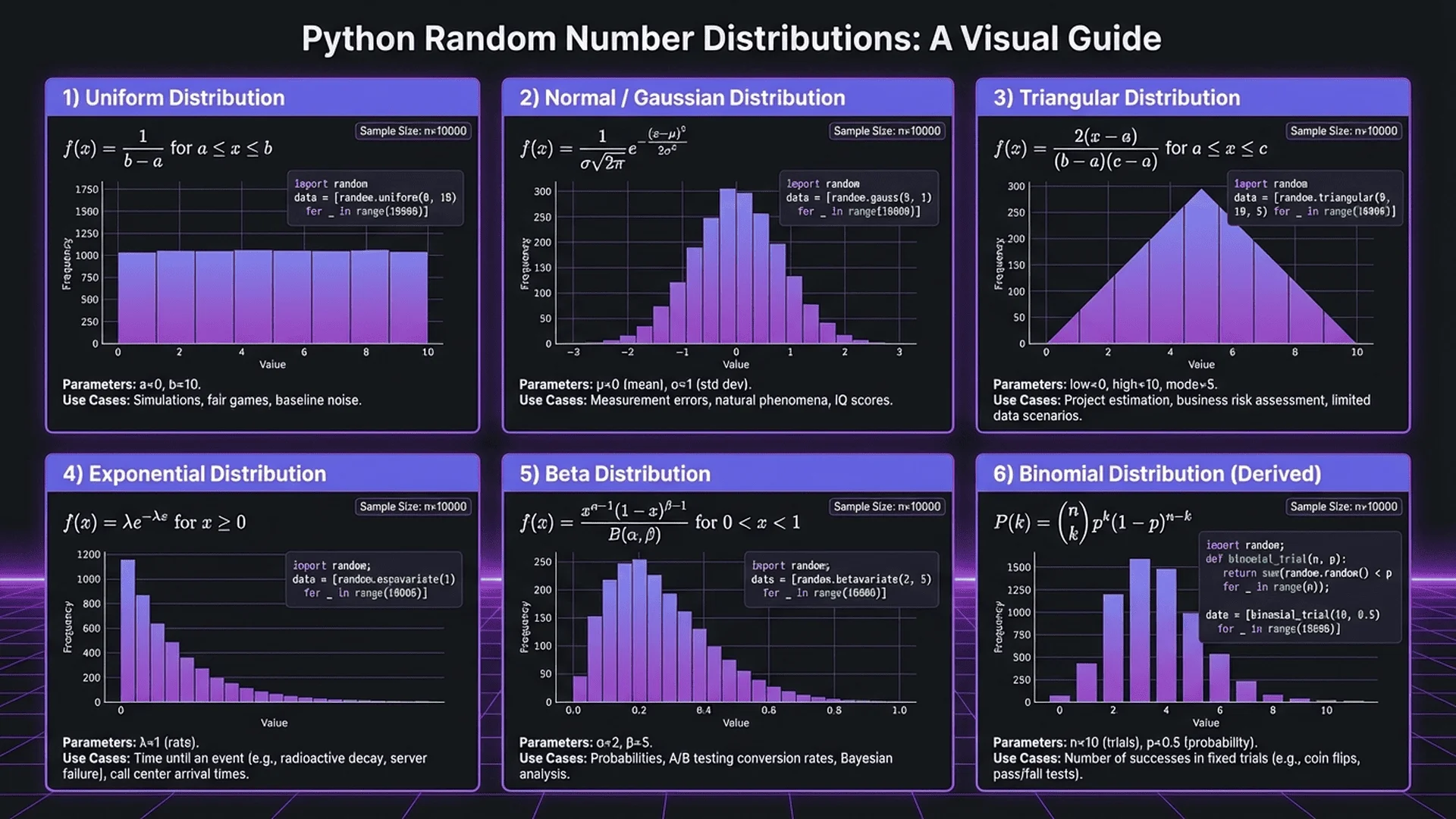
- Need specific statistical distributions
- Performance is critical
Pure Python Examples:
import random

# Large list of random numbers - pure Python
numbers = [random.randint(1, 100) for _ in range(1000000)]

# Random floats
floats = [random.random() for _ in range(100000)]

# Normal distribution (pure Python)
def normal_distribution_sample(mean=0, std_dev=1):
    """Box-Muller transform for normal distribution"""
    import math
    u1 = random.random()
    u2 = random.random()
    z0 = math.sqrt(-2 * math.log(u1)) * math.cos(2 * math.pi * u2)
    return mean + z0 * std_dev

# Generate 1000 samples from normal distribution
normal_samples = [normal_distribution_sample(100, 15) for _ in range(1000)]
When NumPy is Better:
import numpy as np
import random
import time

# Python random - slower
start = time.time()
python_list = [random.random() for _ in range(10000000)]
print(f"Python: {time.time() - start:.2f}s")

# NumPy - much faster
start = time.time()
numpy_array = np.random.random(10000000)
print(f"NumPy: {time.time() - start:.2f}s")

# NumPy is 10-50x faster for large datasets
Q3: Can I generate truly random numbers in Python?
Short Answer: The random module generates pseudo-random numbers (deterministic algorithm). For true randomness, use secrets module (uses OS-level entropy) or external services like Random.org.
Pseudo-Random (random module):
import random

# Pseudo-random - deterministic with same seed
random.seed(42)
print([random.randint(1, 100) for _ in range(5)])
# Always: [82, 15, 74, 2, 37] with seed 42

random.seed(42)
print([random.randint(1, 100) for _ in range(5)])
# Identical: [82, 15, 74, 2, 37]
Cryptographically Secure (secrets module):
import secrets

# Uses OS entropy sources (true randomness)
print([secrets.randbelow(100) for _ in range(5)])
# Different every time, unpredictable
True Random (External Source):
import requests

# Random.org API (true random from atmospheric noise)
response = requests.get('https://www.random.org/integers/?num=10&min=1&max=100&col=1&base=10&format=plain&rnd=new')
true_random_numbers = [int(x) for x in response.text.strip().split()]
print(true_random_numbers)
Bottom Line:
- General use: random module (pseudo-random is fine)
- Security: secrets module (cryptographically secure)
- Scientific research: Consider true random sources or secrets
For deep dive: True Random vs Pseudo Random - Complete Analysis
Q4: How do I make my random numbers reproducible for testing?
Answer: Use random.seed() with a fixed value.
Unit Test Example:
import random
import unittest

def process_random_data():
    """Function that uses randomness"""
    data = [random.randint(1, 100) for _ in range(10)]
    return sum(data) / len(data)

class TestRandomFunction(unittest.TestCase):
    def test_process_with_seed(self):
        """Test with reproducible random data"""
        random.seed(42)
        result1 = process_random_data()

        random.seed(42)
        result2 = process_random_data()

        # Same seed = identical results
        self.assertEqual(result1, result2)

    def test_average_in_expected_range(self):
        """Test average is reasonable"""
        random.seed(42)
        result = process_random_data()

        # Average should be around 50 for uniform 1-100
        self.assertGreater(result, 20)
        self.assertLess(result, 80)

# Run tests
unittest.main(argv=[''], exit=False)
Pytest Example:
import random
import pytest

@pytest.fixture(autouse=True)
def reset_random_seed():
    """Reset seed before each test"""
    random.seed(42)
    yield
    random.seed()  # Reset after test

def test_lottery_numbers():
    """Test lottery number generation"""
    numbers = random.sample(range(1, 50), k=6)

    # With seed 42, always get same numbers
    assert numbers == [32, 43, 4, 47, 7, 39]

def test_dice_roll():
    """Test dice roll"""
    roll = random.randint(1, 6)

    # With seed 42, first roll is always 5
    assert roll == 5
Important: Always reset seed after tests:
def setUp(self):
    random.seed(42)

def tearDown(self):
    random.seed()  # Reset to time-based
Q5: What's the fastest way to generate millions of random numbers?
Answer: Use NumPy for bulk generation, or optimize Python random with list comprehensions.
Performance Comparison:
import random
import numpy as np
import time

COUNT = 10000000

# Method 1: Python loop (slowest)
start = time.time()
numbers1 = []
for _ in range(COUNT):
    numbers1.append(random.randint(1, 100))
print(f"Python loop: {time.time() - start:.2f}s")

# Method 2: Python list comprehension (faster)
start = time.time()
numbers2 = [random.randint(1, 100) for _ in range(COUNT)]
print(f"Python comprehension: {time.time() - start:.2f}s")

# Method 3: NumPy (fastest)
start = time.time()
numbers3 = np.random.randint(1, 101, size=COUNT)
print(f"NumPy: {time.time() - start:.2f}s")

# Results (approximate):
# Python loop: 8.5s
# Python comprehension: 7.2s (15% faster)
# NumPy: 0.3s (25x faster!)
Optimization Tips:
1. Use NumPy for large arrays:
import numpy as np

# Generate 10 million random integers
large_array = np.random.randint(1, 101, size=10000000)
2. Pre-allocate and fill (if you must use Python):
import random

# Pre-allocate list
count = 1000000
numbers = [0] * count

# Fill in-place
for i in range(count):
    numbers[i] = random.randint(1, 100)
3. Use appropriate data structures:
import random
import array

# array module is faster than list for homogeneous data
numbers = array.array('i', (random.randint(1, 100) for _ in range(1000000)))
Conclusion: Mastering Python Random Number Generation
You've now learned the complete toolkit for random number generation in Python, from basics to advanced techniques.
Key Takeaways
Core Functions:
- randint(a, b): Integer in range (both inclusive)
- random(): Float 0.0-1.0
- choice(seq): Pick one element
- sample(seq, k): Pick k unique elements
- shuffle(list): Randomize list order
- seed(n): Reproducible sequences
Security:
- Never use random for security - use secrets module
- secrets.choice(), secrets.token_hex() for secure randomness
- Passwords, tokens, keys require cryptographically secure RNGs
Performance:
- List comprehensions 15-20% faster than loops
- NumPy 10-50x faster for large arrays
- Use sample() not manual loops for unique numbers
Best Practices:
- Use seeds only for reproducibility, never security
- Reset seeds after debugging: random.seed()
- Check k <= len(seq) before calling sample()
- Remember shuffle() modifies in-place, returns None
Next Steps
Want to practice? Try our Random Number Generator tool to visualize concepts before coding.
Continue Learning:
- Random Number Generator Complete Guide - broader concepts
- No-Repeat Random Number Generator - unique number techniques
- True Random vs Pseudo Random - security deep dive
- Excel Random Number Tutorial - non-programming alternative
Explore Related Tools:
- Password Generator - see secrets in action
- Unit Converter - convert random values
- Browse all Developer Tools
Practice Projects:
1. Build a lottery number generator
2. Create a card game with shuffling
3. Implement Monte Carlo simulation
4. Generate realistic test data
5. Build a password generator with strength meter
Remember: The right random function for the job matters. randint() for integers, sample() for unique selection, secrets for security. Master these, and you'll handle any randomness challenge Python throws at you.
Happy coding! 🐍🎲
References
- Python Software Foundation, random — Generate pseudo-random numbers (Python 3.12 Documentation, 2024)
- Python Software Foundation, secrets — Generate secure random numbers (Python 3.12 Documentation, 2024)
- NumPy Documentation, numpy.random (NumPy 1.26 Documentation, 2024)
- Matsumoto & Nishimura, Mersenne Twister: A 623-dimensionally equidistributed uniform pseudo-random number generator (1998)
- Donald E. Knuth, The Art of Computer Programming, Volume 2: Seminumerical Algorithms (3rd Edition, 1997)
- NIST, Special Publication 800-90A: Recommendation for Random Number Generation (2015)
- Stack Overflow, Python Random Module Questions (2024) - Community Q&A
- Real Python, Generating Random Data in Python (2024) - Tutorial resource
- Python Testing Best Practices, Testing with Random Data (2024)
- Tool Master, Random Number Generator Complete Guide (2025)