了解密碼學原理、駭客攻擊手法,以及如何保護您的線上帳號免受威脅Learn cryptography principles, hacker attack methods, and how to protect your online accounts from threats
📅 發布日期📅 Published:2025-01-27⏱️ 閱讀時間:約 10 分鐘⏱️ Reading Time: ~10 min📊 難度:入門到進階📊 Level: Beginner to Advanced🏷️ 分類:資訊安全🏷️ Category: Information Security
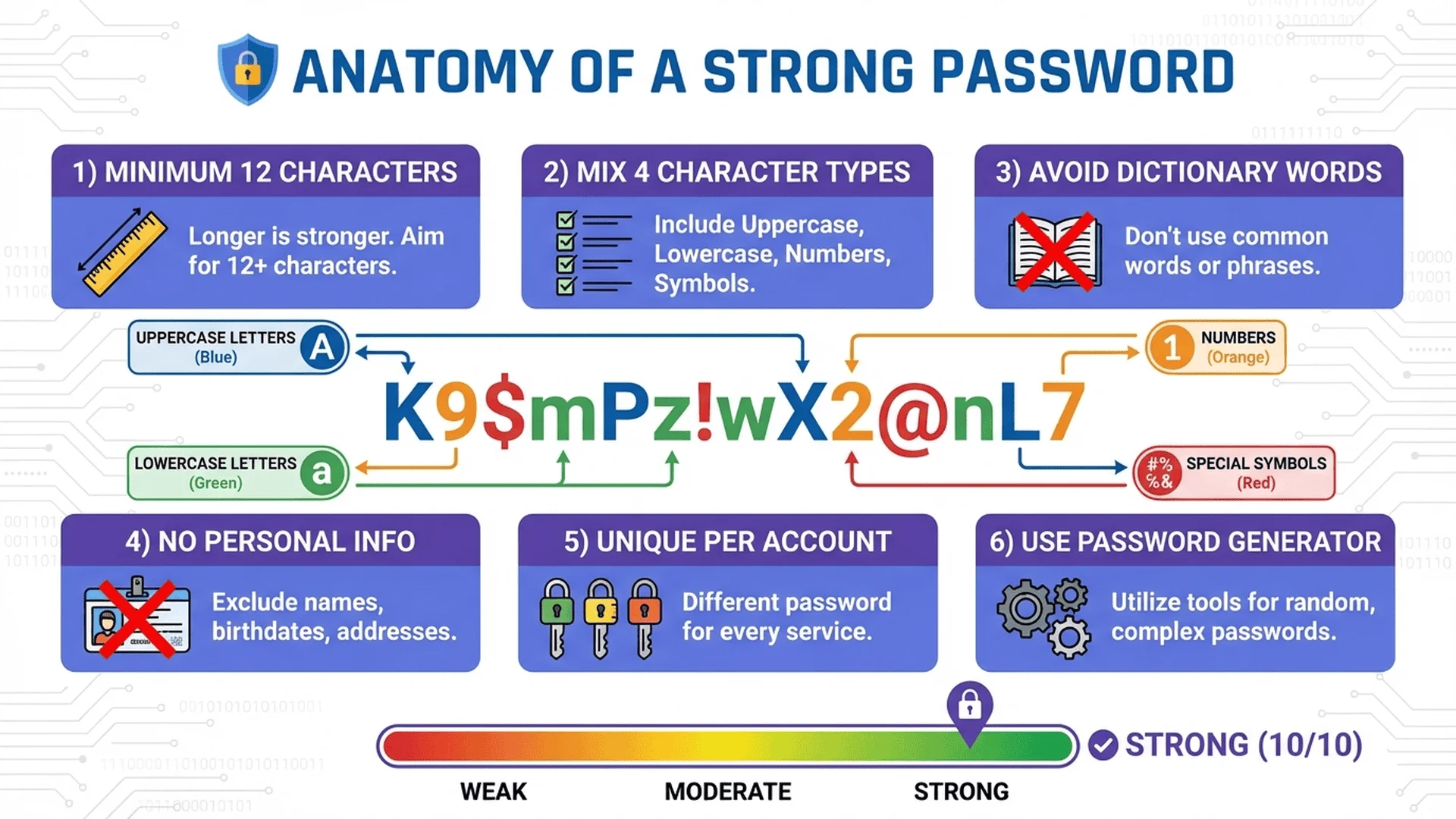
強密碼創建規則圖表:長度要求、字元種類、避免常見詞彙、使用密碼產生器等最佳實踐
🚨 密碼安全的重要性🚨 The Importance of Password Security
在數位時代,密碼是保護您線上身份的第一道防線。根據 2024 年全球資安報告,81% 的資料外洩事件與弱密碼或被盜密碼有關,造成數十億美元的損失和無數個人隱私洩露。In the digital age, passwords are the first line of defense protecting your online identity. According to the 2024 Global Security Report, 81% of data breaches are related to weak or stolen passwords, causing billions of dollars in losses and countless privacy violations.
⚠️ 驚人的統計數據⚠️ Alarming Statistics
全球最常見密碼「123456」被使用超過 1億次The most common password "123456" is used over 100 million times globally
65% 的人在多個網站使用 相同密碼65% of people use the same password across multiple sites
平均每個人擁有 100+ 個線上帳號,但只記得 5-10 組密碼The average person has 100+ online accounts but only remembers 5-10 passwords
駭客每天嘗試數 百萬次 密碼破解攻擊Hackers attempt millions of password cracking attacks daily
一個弱密碼(8位數字)可在 不到1秒 被暴力破解A weak password (8 digits) can be brute-forced in less than 1 second
💰 密碼被盜的後果💰 Consequences of Password Theft
財務損失:銀行帳戶、信用卡資訊被盜,導致金錢損失Financial Loss: Bank accounts and credit card information stolen, leading to monetary loss
身份盜用:駭客冒用您的身份進行詐騙或犯罪活動Identity Theft: Hackers impersonate you for fraud or criminal activities
隱私洩露:私人照片、電子郵件、對話記錄被公開Privacy Breach: Private photos, emails, and conversations exposed
連鎖反應:一個帳號被駭,所有使用相同密碼的帳號都危險Chain Reaction: One hacked account puts all accounts with the same password at risk
信譽損害:社群媒體帳號被盜發布不當內容Reputation Damage: Social media accounts hacked to post inappropriate content
工作影響:公司帳號被駭導致商業機密外洩Work Impact: Company accounts hacked leading to business secrets leakage
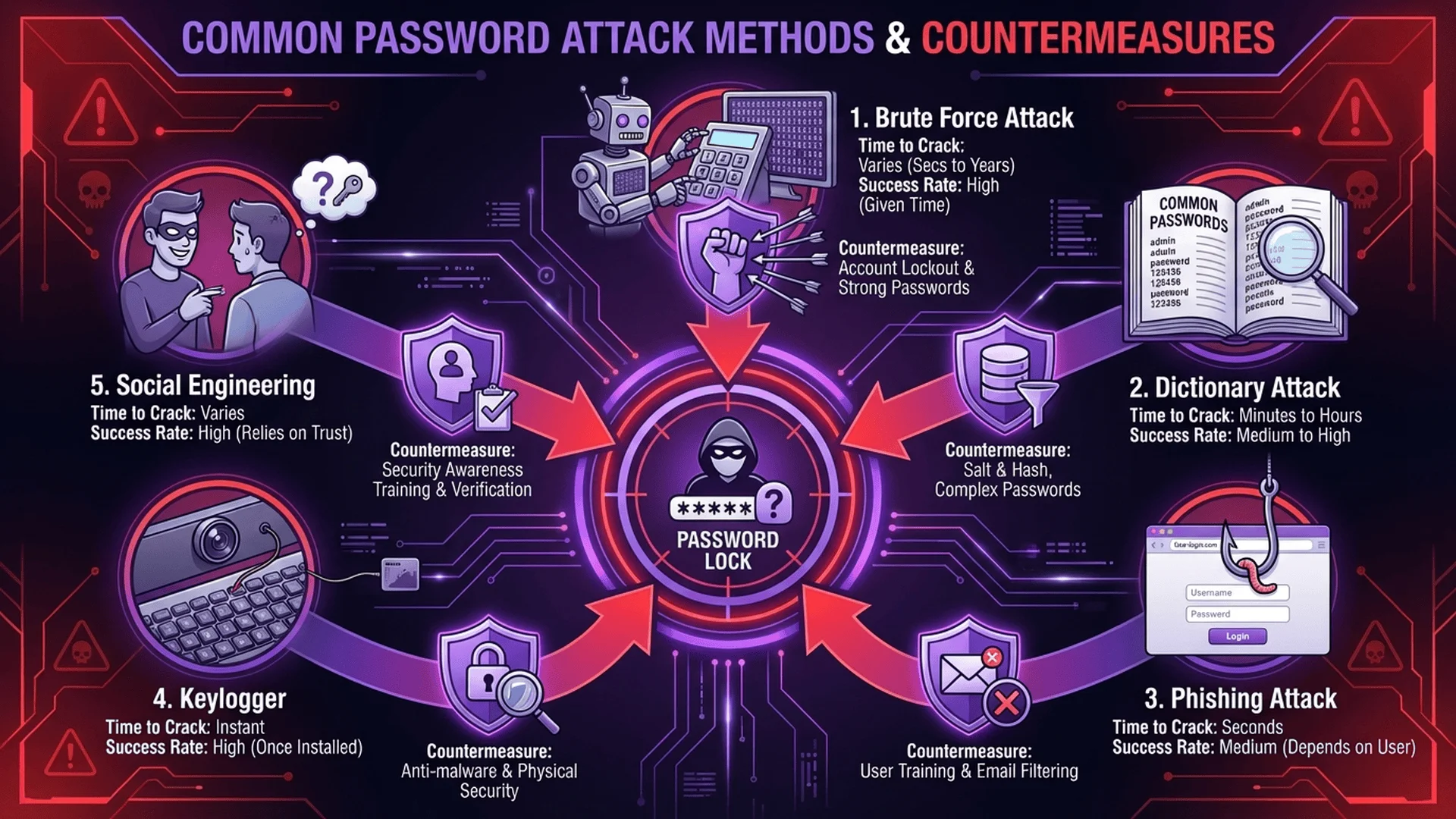
常見駭客攻擊方式圖解:暴力破解、字典攻擊、釣魚網站、鍵盤側錄等攻擊手法
🎯 駭客如何破解您的密碼?🎯 How Do Hackers Crack Your Passwords?
1️⃣ 暴力破解攻擊(Brute Force Attack)1️⃣ Brute Force Attack
原理:駭客使用程式嘗試所有可能的字元組合,直到找到正確密碼。Principle: Hackers use programs to try all possible character combinations until finding the correct password.
⏱️ 暴力破解時間表⏱️ Brute Force Time Chart
密碼類型Password Type
範例Example
破解時間Crack Time
6位純數字6 digits only
123456
不到1秒Less than 1 sec
8位純小寫字母8 lowercase letters
password
數分鐘Minutes
10位大小寫混合10 mixed case
HelloWorld
數小時Hours
12位混合字元12 mixed chars
aB3$xY9pQ2zL
數年Years
16位混合字元16 mixed chars
7#mK!9Qx@2pL$5vN
數百萬年Millions of years
結論Conclusion:密碼長度和複雜度呈指數級增加破解難度!Password length and complexity exponentially increase cracking difficulty!
2️⃣ 字典攻擊(Dictionary Attack)2️⃣ Dictionary Attack
原理:駭客使用預先準備的「常見密碼清單」嘗試登入,包括:Principle: Hackers use pre-prepared "common password lists" to attempt logins, including:
常見單字(password、admin、welcome)Common words (password, admin, welcome)
常見數字組合(123456、000000、password1)Common number combinations (123456, 000000, password1)
原理:當網站資料庫被駭,駭客取得加密後的密碼(雜湊值),使用預先計算的「彩虹表」快速反推原始密碼。Principle: When a website database is breached, hackers obtain encrypted passwords (hash values) and use pre-computed "rainbow tables" to quickly reverse-engineer the original passwords.
雜湊函數Hash Function:將密碼轉換為固定長度字串(如 MD5、SHA-1)Converts passwords to fixed-length strings (e.g., MD5, SHA-1)
彩虹表Rainbow Table:預先計算數百萬個常見密碼的雜湊值Pre-computed hash values of millions of common passwords
破解方式Cracking Method:比對資料庫中的雜湊值與彩虹表,找到對應密碼Match hash values in the database with rainbow tables to find corresponding passwords
防禦方式Defense:現代網站使用「加鹽(Salt)」技術,在密碼加密前添加隨機字串,使彩虹表失效。Modern websites use "salting" technique, adding random strings before encrypting passwords, making rainbow tables ineffective.
4️⃣ 網路釣魚(Phishing)4️⃣ Phishing
原理:駭客創建假冒的登入頁面(如偽造的銀行網站、Facebook),誘騙使用者輸入密碼。Principle: Hackers create fake login pages (like counterfeit bank websites, Facebook) to trick users into entering passwords.
電子郵件釣魚:假冒官方電子郵件,要求「驗證帳號」或「重設密碼」Email Phishing: Fake official emails requesting "account verification" or "password reset"
網址偽造:使用相似網址(如 paypa1.com 而非 paypal.com)URL Spoofing: Using similar URLs (like paypa1.com instead of paypal.com)
社交工程:假扮客服人員、IT部門索取密碼Social Engineering: Impersonating customer service or IT staff to request passwords
原理:駭客取得某網站洩露的帳號密碼,自動化嘗試在其他網站登入(利用多數人重複使用密碼的習慣)。Principle: Hackers obtain leaked account credentials from one site and automatically try to log in to other sites (exploiting the habit of reusing passwords).
範例流程Example Process:
某小論壇資料庫被駭,洩露 100萬組帳號密碼A small forum database is hacked, leaking 1 million account credentials
駭客使用自動化工具在 Gmail、Facebook、銀行網站嘗試登入Hackers use automated tools to try logging into Gmail, Facebook, banking sites
假設 10% 的人使用相同密碼,駭客成功入侵 10萬個帳號If 10% use the same password, hackers successfully breach 100,000 accounts
駭客盜取金錢、個人資訊,或轉售帳號Hackers steal money, personal info, or resell accounts
防禦方式Defense:每個網站使用唯一密碼 + 密碼管理器。Use unique passwords for each site + password manager.
🎯 密碼短語(Passphrase):另一種選擇🎯 Passphrase: Another Option
對於需要記憶的密碼(如密碼管理器主密碼),可以使用 密碼短語:4-6 個隨機單詞組成的長句。For passwords you need to memorize (like password manager master password), use passphrases: long sentences made of 4-6 random words.
優點:容易記憶、足夠長(30+ 字元)、易於輸入Advantages: Easy to remember, long enough (30+ chars), easy to type
注意:單詞必須 真正隨機,不能是名言、歌詞、電影台詞Note: Words must be truly random, not quotes, lyrics, or movie lines
✅ 推薦:使用密碼產生器✅ Recommended: Use Password Generator
人類無法創造真正隨機的密碼,使用我們的 密碼產生器 自動生成強密碼。Humans can't create truly random passwords. Use our Password Generator to automatically generate strong passwords.
特點Features:
使用密碼學安全的隨機數生成器Cryptographically secure random number generator
100% 本地處理,密碼不會上傳到伺服器100% local processing, passwords never uploaded to servers
可自訂長度、字元類型Customizable length and character types
即時顯示密碼強度和預估破解時間Real-time password strength and estimated crack time
🗂️ 密碼管理最佳實踐🗂️ Password Management Best Practices
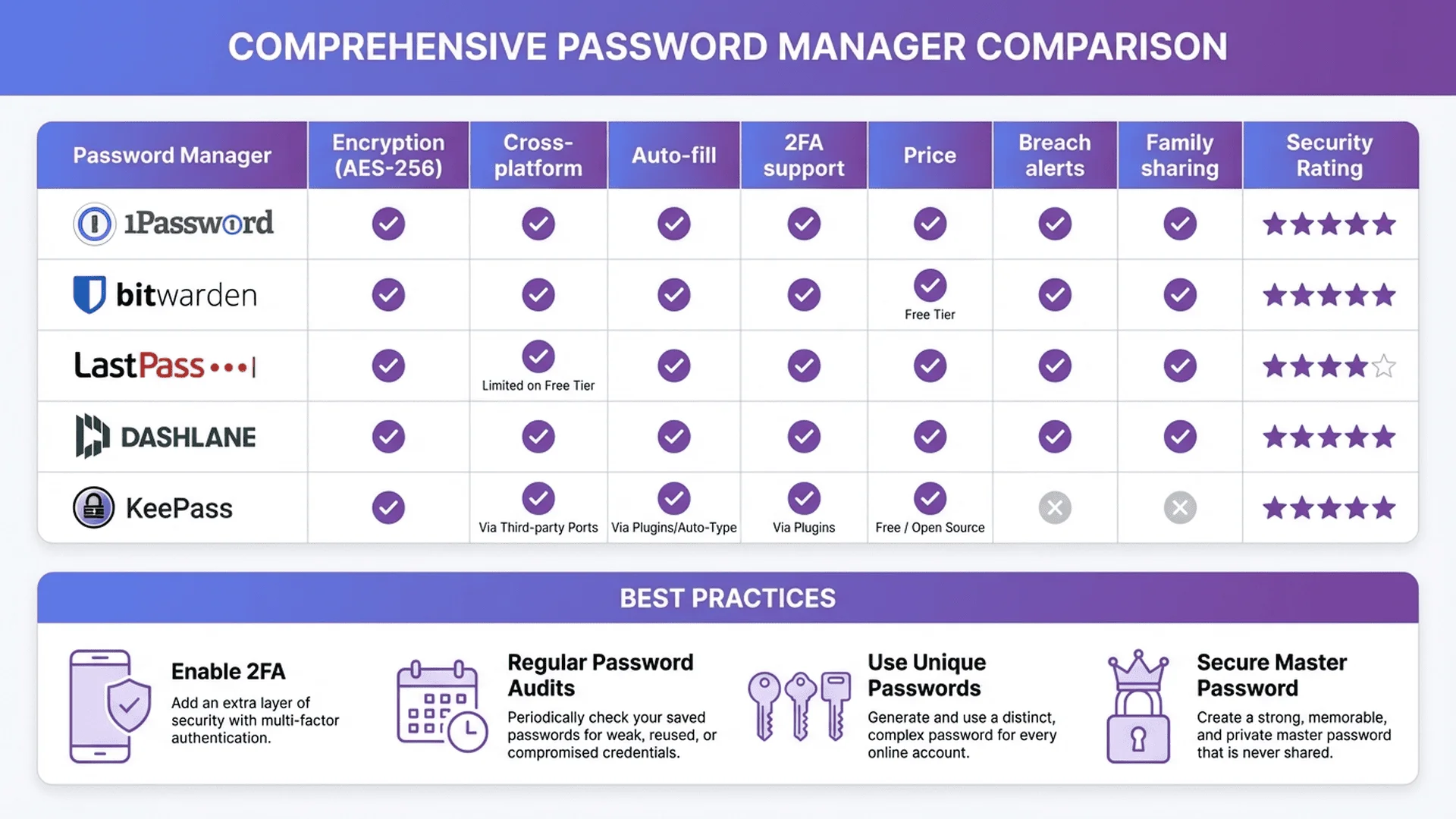
為什麼需要密碼管理器?Why Do You Need a Password Manager?
平均每個人擁有 100+ 個線上帳號,如果每個都使用不同的 16 位隨機密碼,根本無法記憶。密碼管理器解決了這個問題:The average person has 100+ online accounts. Using different 16-character random passwords for each is impossible to remember. Password managers solve this problem:
安全儲存Secure Storage:所有密碼加密儲存在「數位保險箱」中All passwords encrypted and stored in a "digital vault"
只記一個Remember One:您只需記住一個主密碼You only need to remember one master password
自動填入Auto-Fill:瀏覽器擴充套件自動填入密碼Browser extensions automatically fill in passwords
跨裝置同步Cross-Device Sync:手機、電腦、平板同步存取Access synced across phone, computer, and tablet
安全報告Security Reports:自動檢測弱密碼、重複密碼、洩露密碼Automatically detect weak, reused, and leaked passwords