JSON Schema驗證實踐
JSON Schema Validation Practical Guide | Build Automated Data Validation System in 5 Steps
Have you ever encountered a situation in production where an API suddenly returns incorrect data formats, causing your entire application to crash? Or spent hours debugging only to discover the issue was a data type error in a single field in a config file? The root cause of these problems is the lack of automated data validation mechanisms. JSON Schema was created to solve this pain point! It allows you to define JSON data structure, types, and constraints, then automatically validate whether data meets specifications. This article uses 5 practical steps to teach you how to build a complete JSON Schema validation system from scratch, including 10+ useful schema examples, advanced techniques, and real-world project applications. Whether you're an API developer, full-stack engineer, or data engineer, mastering JSON Schema will make your systems more stable and reliable!
What is JSON Schema?
JSON Schema Definition
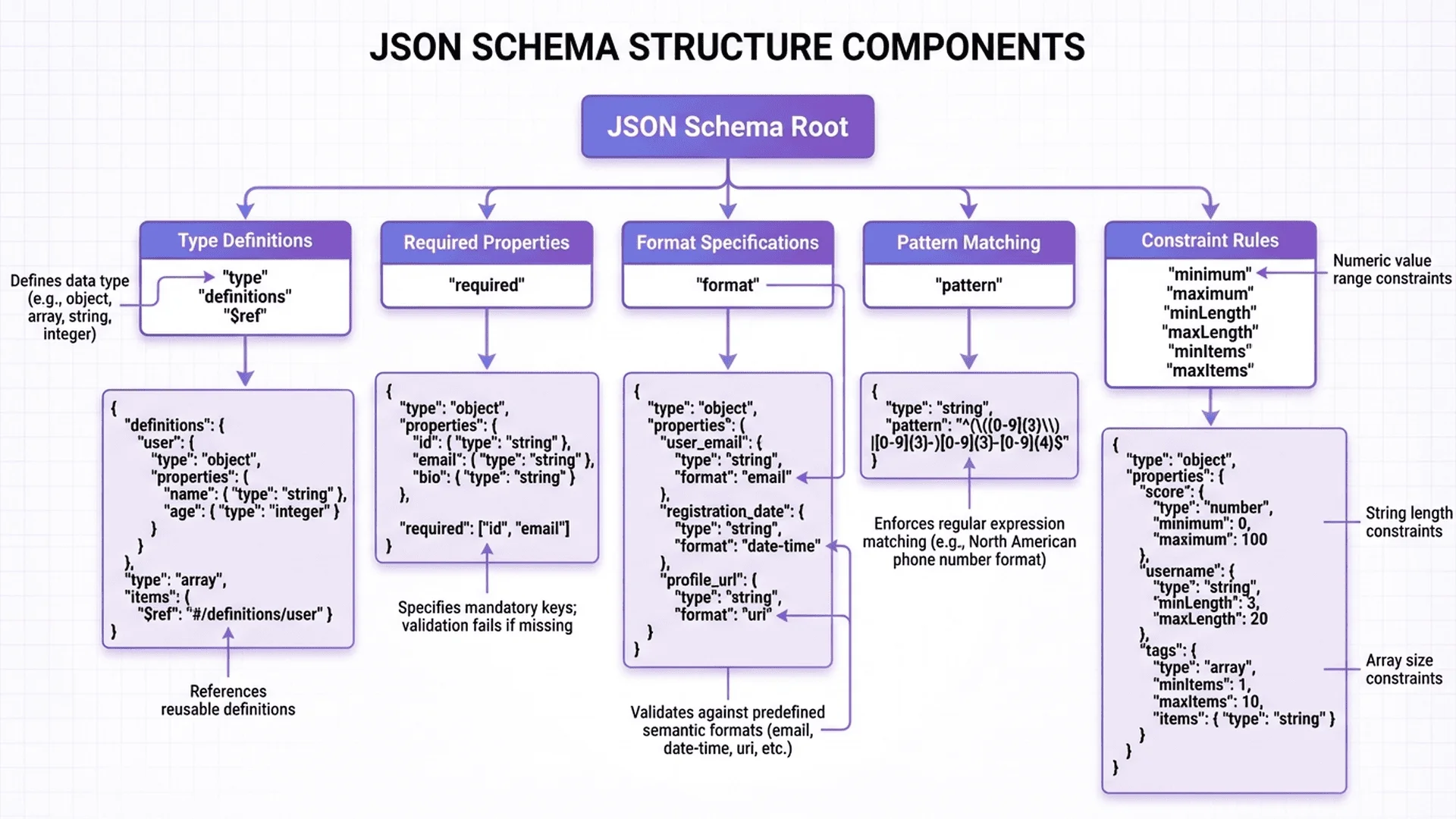
JSON Schema is a specification for describing JSON data structure. It is itself in JSON format, used to define:
- Data types (string, number, object, array, etc.)
- Required fields (required fields)
- Numeric ranges (minimum, maximum)
- String formats (email, uri, date, etc.)
- Array lengths (minItems, maxItems)
- Nested structures (nested objects)
Simple Example:
JSON Data:
{
  "name": "Alice",
  "age": 30,
  "email": "[email protected]"
}
JSON Schema (describing the structure above):
{
  "$schema": "http://json-schema.org/draft-07/schema#",
  "type": "object",
  "properties": {
    "name": {
      "type": "string"
    },
    "age": {
      "type": "number",
      "minimum": 0,
      "maximum": 150
    },
    "email": {
      "type": "string",
      "format": "email"
    }
  },
  "required": ["name", "email"]
}
This schema defines:
- ✅ name must be a string and is required
- ✅ age must be a number between 0-150
- ✅ email must be a string in email format and is required
Why Do We Need JSON Schema?
Problem 1: Discovering Data Errors at Runtime
Without Schema Validation:
// API returns data
const user = await fetchUser(123);

// Code assumes age is a number
const canVote = user.age >= 18;  // 💥 If age is string "30", logic error!
With Schema Validation:
const user = await fetchUser(123);

// Validate data first
if (!validateSchema(user, userSchema)) {
  throw new Error('Invalid user data');
}

// Guaranteed age is a number
const canVote = user.age >= 18;  // ✅ Safe
Problem 2: API Documentation Inconsistent with Actual Data
Developers often encounter:
- Documentation says user_id but API returns userId
- Documentation says required, but API sometimes doesn't return it
- Documentation says number, but API returns string
Solution:
Use Schema as "Single Source of Truth", auto-generate documentation, ensure consistency.
Problem 3: High Communication Cost for Front-End/Back-End Data Formats
Traditional Communication:
- Backend: "This field is optional"
- Frontend: "So both null and undefined are okay?"
- Backend: "Only null"
- Frontend: "What about empty string?"
- ...(10 rounds back and forth)
Using Schema:
{
  "profile": {
    "type": ["object", "null"],  // Can be object or null
    "properties": {
      "bio": {
        "type": "string",
        "minLength": 1  // No empty strings
      }
    }
  }
}
Define once, everyone follows, reducing 90% communication cost.
Problem 4: Low Unit Test Coverage
Writing unit tests requires manually checking each field:
// Without Schema: manual checks
test('user data', () => {
  expect(typeof user.name).toBe('string');
  expect(typeof user.age).toBe('number');
  expect(user.age).toBeGreaterThan(0);
  expect(user.email).toMatch(/^.+@.+$/);
  // ... 20 lines
});

// With Schema: one line
test('user data', () => {
  expect(validate(user, userSchema)).toBe(true);
});
JSON Schema Application Scenarios
| Scenario | Use Case | Example |
|---|---|---|
| API Validation | Validate request/response format | Check if POST body is valid |
| Config File Validation | Ensure config correctness | Validate config.json |
| Data Migration | Validate data integrity | Database migration before/after check |
| Form Validation | Frontend form validation | Auto-generate forms from Schema |
| Auto-Generate Documentation | API documentation | Generate OpenAPI docs from Schema |
| Mock Data Generation | Test data | Auto-generate test data from Schema |
Step 1: Build Your First Schema
Basic Structure
Every JSON Schema contains these basic fields:
{
  "$schema": "http://json-schema.org/draft-07/schema#",
  "title": "User Schema",
  "description": "Schema for user data",
  "type": "object"
}
Field Descriptions:
| Field | Required | Description |
|---|---|---|
$schema |
Recommended | Specify Schema version (draft-07 is currently most stable) |
title |
Optional | Schema title (for documentation) |
description |
Optional | Schema description |
type |
Required | Data type (object, array, string, etc.) |
Define Object Properties
Example: Simple User Schema
{
  "$schema": "http://json-schema.org/draft-07/schema#",
  "type": "object",
  "properties": {
    "id": {
      "type": "integer",
      "description": "User ID"
    },
    "name": {
      "type": "string",
      "description": "Full name"
    },
    "email": {
      "type": "string",
      "format": "email"
    },
    "age": {
      "type": "integer",
      "minimum": 0,
      "maximum": 150
    },
    "isActive": {
      "type": "boolean"
    }
  },
  "required": ["id", "name", "email"]
}
Validation Examples:
✅ Passes Validation:
{
  "id": 1,
  "name": "Alice Wang",
  "email": "[email protected]",
  "age": 30,
  "isActive": true
}
❌ Fails Validation:
{
  "id": "1",          // ❌ Should be number
  "name": "Alice",
  "email": "invalid"  // ❌ Invalid email format
  // ❌ Missing required field id
}
Common Data Types
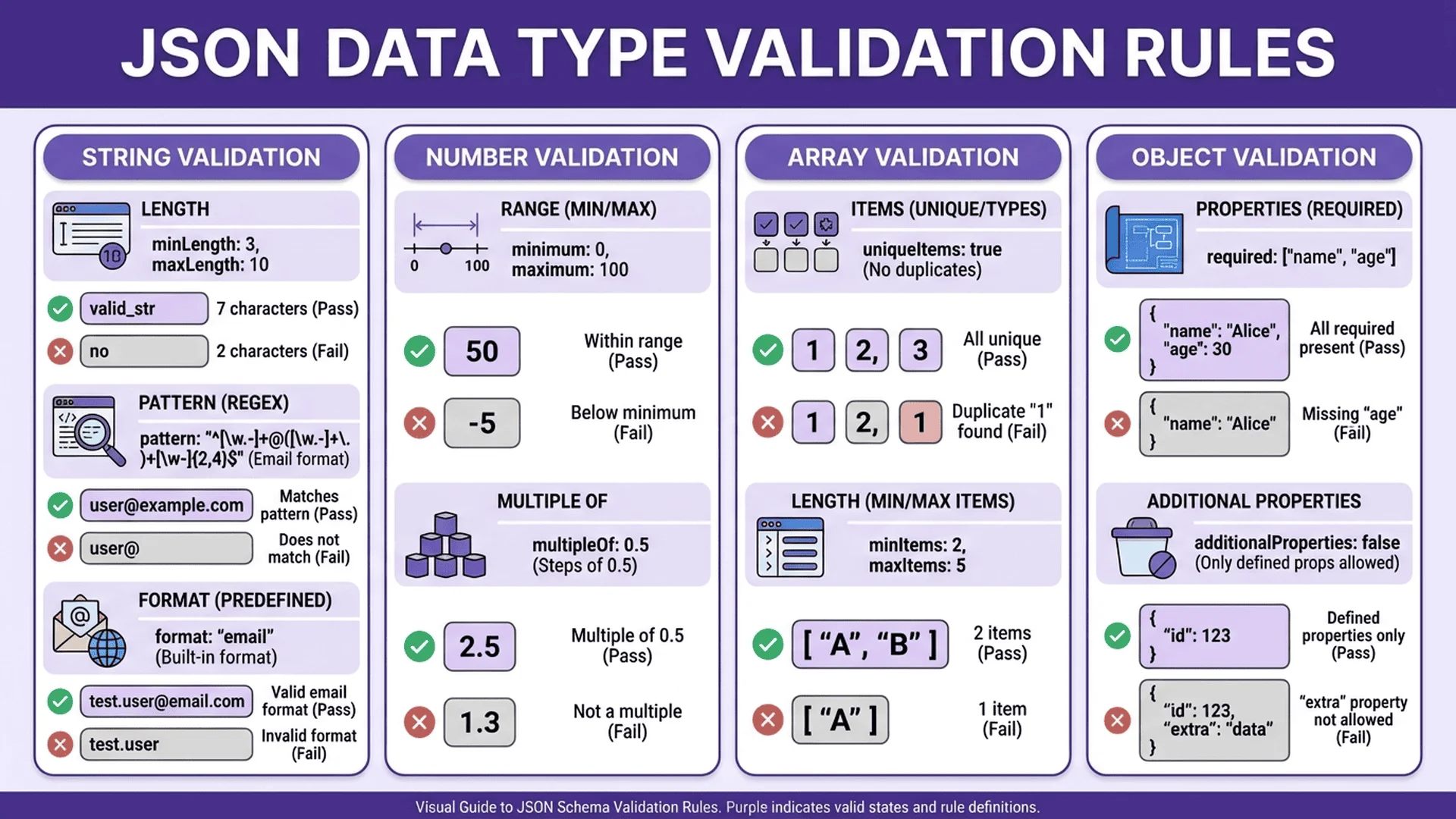
JSON Schema supports 7 basic types:
1. string
{
  "type": "string",
  "minLength": 1,      // Minimum length
  "maxLength": 100,    // Maximum length
  "pattern": "^[A-Z]"  // Regex: must start with uppercase
}
Common formats:
| format | Description | Example |
|---|---|---|
email |
Email address | [email protected] |
uri |
URI | https://example.com |
date |
Date | 2025-01-27 |
time |
Time | 14:30:00 |
date-time |
Date-time | 2025-01-27T14:30:00Z |
ipv4 |
IPv4 address | 192.168.1.1 |
ipv6 |
IPv6 address | ::1 |
2. number / integer
{
  "type": "number",
  "minimum": 0,           // Minimum value
  "maximum": 100,         // Maximum value
  "exclusiveMinimum": 0,  // Excludes 0
  "multipleOf": 5         // Must be multiple of 5
}
3. boolean
{
  "type": "boolean"
}
4. null
{
  "type": "null"
}
5. array
{
  "type": "array",
  "items": {
    "type": "string"  // Array element type
  },
  "minItems": 1,      // At least 1 element
  "maxItems": 10,     // At most 10 elements
  "uniqueItems": true // Unique elements
}
6. object
{
  "type": "object",
  "properties": {
    "name": { "type": "string" }
  },
  "required": ["name"],
  "additionalProperties": false  // No additional properties
}
7. Multiple Types (using array)
{
  "type": ["string", "null"]  // Can be string or null
}
Step 2: Implement Common Validation Rules
Rule 1: Required vs Optional
{
  "type": "object",
  "properties": {
    "username": { "type": "string" },
    "email": { "type": "string" },
    "phone": { "type": "string" }
  },
  "required": ["username", "email"]  // phone is optional
}
Rule 2: String Length Constraints
Example: Password Rules
{
  "password": {
    "type": "string",
    "minLength": 8,
    "maxLength": 128,
    "pattern": "^(?=.*[a-z])(?=.*[A-Z])(?=.*\\d).+$"
    // Must contain lowercase, uppercase, and digit
  }
}
Rule 3: Numeric Ranges
Example: Age
{
  "age": {
    "type": "integer",
    "minimum": 18,
    "maximum": 65
  }
}
Rule 4: Enumerated Values (enum)
Example: Order Status
{
  "status": {
    "type": "string",
    "enum": ["pending", "processing", "completed", "cancelled"]
  }
}
Rule 5: Array Validation
Example: Tags Array
{
  "tags": {
    "type": "array",
    "items": {
      "type": "string",
      "minLength": 1,
      "maxLength": 20
    },
    "minItems": 1,
    "maxItems": 5,
    "uniqueItems": true
  }
}
Validation Results:
✅ ["javascript", "nodejs"] - Pass
❌ ["js"] - Pass (but would fail if minItems: 2)
❌ ["javascript", "javascript"] - Fail (uniqueItems)
❌ ["a", "b", "c", "d", "e", "f"] - Fail (exceeds maxItems)
Rule 6: Nested Objects
Example: User Profile
{
  "type": "object",
  "properties": {
    "name": { "type": "string" },
    "address": {
      "type": "object",
      "properties": {
        "street": { "type": "string" },
        "city": { "type": "string" },
        "zipCode": {
          "type": "string",
          "pattern": "^\\d{3}$"  // Taiwan postal code 3 digits
        }
      },
      "required": ["city", "zipCode"]
    }
  },
  "required": ["name", "address"]
}
Valid Data:
{
  "name": "Alice",
  "address": {
    "street": "123 Main St",
    "city": "Taipei",
    "zipCode": "100"
  }
}
Rule 7: Array of Objects
Example: Order Items
{
  "items": {
    "type": "array",
    "items": {
      "type": "object",
      "properties": {
        "productId": { "type": "integer" },
        "quantity": {
          "type": "integer",
          "minimum": 1
        },
        "price": {
          "type": "number",
          "minimum": 0
        }
      },
      "required": ["productId", "quantity", "price"]
    },
    "minItems": 1
  }
}
Step 3: Advanced Validation Techniques
Technique 1: Conditional Validation (if-then-else)
Scenario: If country is Taiwan, then zipCode must be 3 digits.
{
  "type": "object",
  "properties": {
    "country": { "type": "string" },
    "zipCode": { "type": "string" }
  },
  "if": {
    "properties": {
      "country": { "const": "Taiwan" }
    }
  },
  "then": {
    "properties": {
      "zipCode": {
        "pattern": "^\\d{3}$"
      }
    }
  },
  "else": {
    "properties": {
      "zipCode": {
        "pattern": "^\\d{5}$"  // Other countries 5 digits
      }
    }
  }
}
Technique 2: Dependency Validation (dependencies)
Scenario: If creditCard field exists, then cvv and expiryDate are required.
{
  "type": "object",
  "properties": {
    "creditCard": { "type": "string" },
    "cvv": { "type": "string" },
    "expiryDate": { "type": "string" }
  },
  "dependencies": {
    "creditCard": ["cvv", "expiryDate"]
  }
}
Technique 3: Schema Composition (allOf, anyOf, oneOf)
allOf (must match all schemas)
{
  "allOf": [
    {
      "type": "object",
      "properties": {
        "name": { "type": "string" }
      }
    },
    {
      "properties": {
        "age": { "type": "number" }
      }
    }
  ]
}
// Must have both name and age
anyOf (match any schema)
{
  "anyOf": [
    { "type": "string" },
    { "type": "number" }
  ]
}
// Can be string or number
oneOf (match exactly one schema)
{
  "oneOf": [
    {
      "properties": {
        "type": { "const": "individual" },
        "ssn": { "type": "string" }
      },
      "required": ["type", "ssn"]
    },
    {
      "properties": {
        "type": { "const": "company" },
        "taxId": { "type": "string" }
      },
      "required": ["type", "taxId"]
    }
  ]
}
// Individual must have ssn, company must have taxId, can't have both
Technique 4: Regular Expression Validation
Example: Taiwan Mobile Phone
{
  "phone": {
    "type": "string",
    "pattern": "^09\\d{8}$"
  }
}
Example: Taiwan ID Number
{
  "idNumber": {
    "type": "string",
    "pattern": "^[A-Z][12]\\d{8}$"
  }
}
Technique 5: Custom Error Messages (requires validator support)
Some validators (like Ajv) support custom error messages:
{
  "age": {
    "type": "number",
    "minimum": 18,
    "errorMessage": {
      "minimum": "Must be at least 18 years old"
    }
  }
}
Step 4: Using Schema in Code
JavaScript/Node.js (using Ajv)
Installation:
npm install ajv
Basic Usage:
const Ajv = require('ajv');
const ajv = new Ajv();

// Define Schema
const schema = {
  type: 'object',
  properties: {
    name: { type: 'string' },
    age: { type: 'number', minimum: 0 }
  },
  required: ['name', 'age']
};

// Compile Schema
const validate = ajv.compile(schema);

// Validate data
const data = {
  name: 'Alice',
  age: 30
};

const valid = validate(data);

if (valid) {
  console.log('✅ Data is valid');
} else {
  console.log('❌ Data is invalid:');
  console.log(validate.errors);
}
Error Message Example:
[
  {
    keyword: 'type',
    dataPath: '.age',
    message: 'should be number',
    params: { type: 'number' }
  }
]
Python (using jsonschema)
Installation:
pip install jsonschema
Usage:
from jsonschema import validate, ValidationError
import json

schema = {
    "type": "object",
    "properties": {
        "name": {"type": "string"},
        "age": {"type": "number", "minimum": 0}
    },
    "required": ["name", "age"]
}

data = {
    "name": "Alice",
    "age": 30
}

try:
    validate(instance=data, schema=schema)
    print("✅ Data is valid")
except ValidationError as e:
    print(f"❌ Data is invalid: {e.message}")
Express.js API Validation
Using express-json-validator-middleware:
npm install express-json-validator-middleware
Implementation:
const express = require('express');
const { Validator } = require('express-json-validator-middleware');

const app = express();
app.use(express.json());

const validator = new Validator();
const validate = validator.validate;

// Define Schema
const userSchema = {
  type: 'object',
  properties: {
    name: { type: 'string', minLength: 1 },
    email: { type: 'string', format: 'email' },
    age: { type: 'integer', minimum: 18 }
  },
  required: ['name', 'email']
};

// Apply Schema validation
app.post('/api/users', validate({ body: userSchema }), (req, res) => {
  // Data already validated
  const user = req.body;
  res.json({ success: true, user });
});

// Error handling
app.use((err, req, res, next) => {
  if (err.name === 'JsonSchemaValidationError') {
    res.status(400).json({
      error: 'Validation failed',
      details: err.validationErrors
    });
  } else {
    next(err);
  }
});

app.listen(3000);
Testing:
# ✅ Valid request
curl -X POST http://localhost:3000/api/users \
  -H "Content-Type: application/json" \
  -d '{"name":"Alice","email":"[email protected]","age":25}'

# ❌ Invalid request (age < 18)
curl -X POST http://localhost:3000/api/users \
  -H "Content-Type: application/json" \
  -d '{"name":"Bob","email":"[email protected]","age":15}'
Step 5: Real-World Application Scenarios
Scenario 1: API Request/Response Validation
Problem: Ensure API request data meets specifications.
Solution: Add Schema validation to API endpoints.
Example: User Registration API
// schemas/user.js
const registerSchema = {
  type: 'object',
  properties: {
    username: {
      type: 'string',
      minLength: 3,
      maxLength: 20,
      pattern: '^[a-zA-Z0-9_]+$'
    },
    password: {
      type: 'string',
      minLength: 8
    },
    email: {
      type: 'string',
      format: 'email'
    }
  },
  required: ['username', 'password', 'email'],
  additionalProperties: false  // No additional fields
};

// routes/auth.js
app.post('/api/register', validate({ body: registerSchema }), async (req, res) => {
  const { username, password, email } = req.body;

  // Data validated, safe to process
  const user = await User.create({ username, password, email });

  res.json({ success: true, userId: user.id });
});
Advantages:
- Automatically reject invalid requests
- Reduce manual checking code
- Unified error message format
Scenario 2: Config File Validation
Problem: Application config file format errors cause startup failure.
Solution: Validate Schema when loading config files.
Example: Application Config
// config.schema.json
{
  "$schema": "http://json-schema.org/draft-07/schema#",
  "type": "object",
  "properties": {
    "server": {
      "type": "object",
      "properties": {
        "port": {
          "type": "integer",
          "minimum": 1,
          "maximum": 65535
        },
        "host": { "type": "string" }
      },
      "required": ["port"]
    },
    "database": {
      "type": "object",
      "properties": {
        "url": { "type": "string", "format": "uri" },
        "poolSize": {
          "type": "integer",
          "minimum": 1,
          "maximum": 100
        }
      },
      "required": ["url"]
    }
  },
  "required": ["server", "database"]
}
// app.js
const fs = require('fs');
const Ajv = require('ajv');

function loadConfig() {
  const config = JSON.parse(fs.readFileSync('config.json', 'utf8'));
  const schema = JSON.parse(fs.readFileSync('config.schema.json', 'utf8'));

  const ajv = new Ajv();
  const validate = ajv.compile(schema);

  if (!validate(config)) {
    console.error('❌ Config validation failed:');
    console.error(validate.errors);
    process.exit(1);
  }

  return config;
}

const config = loadConfig();
console.log('✅ Config loaded successfully');
Advantages:
- Discover config errors at startup
- Avoid runtime unexpected errors
- Provide clear error messages
Scenario 3: Data Migration Validation
Problem: After database migration, ensure all data matches new structure.
Solution: Batch validate all data after migration.
const { MongoClient } = require('mongodb');
const Ajv = require('ajv');

const newUserSchema = {
  type: 'object',
  properties: {
    _id: { type: 'string' },
    name: { type: 'string' },
    email: { type: 'string', format: 'email' },
    createdAt: { type: 'string', format: 'date-time' }
  },
  required: ['_id', 'name', 'email', 'createdAt']
};

async function validateMigration() {
  const client = await MongoClient.connect('mongodb://localhost:27017');
  const db = client.db('myapp');
  const users = await db.collection('users').find({}).toArray();

  const ajv = new Ajv();
  const validate = ajv.compile(newUserSchema);

  let validCount = 0;
  let invalidCount = 0;

  users.forEach(user => {
    if (validate(user)) {
      validCount++;
    } else {
      invalidCount++;
      console.error(`❌ User ${user._id} validation failed:`, validate.errors);
    }
  });

  console.log(`✅ Valid data: ${validCount}`);
  console.log(`❌ Invalid data: ${invalidCount}`);

  client.close();
}

validateMigration();
Scenario 4: Frontend Form Validation
Problem: Frontend form validation logic is complex, easy to miss.
Solution: Use JSON Schema to auto-generate form validation.
Using React + react-jsonschema-form:
npm install @rjsf/core @rjsf/validator-ajv8
import Form from '@rjsf/core';
import validator from '@rjsf/validator-ajv8';

const schema = {
  type: 'object',
  properties: {
    name: {
      type: 'string',
      title: 'Name',
      minLength: 1
    },
    email: {
      type: 'string',
      title: 'Email',
      format: 'email'
    },
    age: {
      type: 'integer',
      title: 'Age',
      minimum: 18
    }
  },
  required: ['name', 'email']
};

function MyForm() {
  const handleSubmit = ({ formData }) => {
    console.log('Form data:', formData);
    // Data already validated
  };

  return (
    <Form
      schema={schema}
      validator={validator}
      onSubmit={handleSubmit}
    />
  );
}
Auto-generated:
- ✅ Form fields
- ✅ Validation rules
- ✅ Error messages
- ✅ Required markers
Tool and Resource Recommendations
Online Schema Validation Tools
While JSON Schema is primarily used in code, online tools can help you quickly test:
Recommended Tool: Tool Master JSON Parser
While mainly for JSON validation, it also supports basic structure checking. For complete Schema validation, code-based approaches are recommended.
Schema Generation Tools
Generate Schema from Example JSON:
Use online tools or CLI:
# Using json-schema-generator
npm install -g json-schema-generator

# Generate Schema from JSON file
json-schema-generator input.json > schema.json
Validator Libraries
| Language | Library | Features |
|---|---|---|
| JavaScript | Ajv | Fastest, most popular, supports draft-07 |
| Python | jsonschema | Officially recommended |
| Java | json-schema-validator | Feature-complete |
| Go | gojsonschema | High performance |
| PHP | justinrainbow/json-schema | Easy to use |
Advanced Learning Resources
- Official Specification: json-schema.org
- Interactive Tutorial: json-schema.org/learn/getting-started
- JSON Schema Store: schemastore.org - Common config file Schema examples
- JSON Parser Technical Documentation - Deep dive into JSON processing principles
Best Practices and Considerations
Best Practices
1. Schema Version Control
Version control schemas with code:
project/
├── schemas/
│   ├── v1/
│   │   └── user.json
│   └── v2/
│       └── user.json
└── src/
2. Separation of Concerns
Bad: All schemas in one file
{
  "user": { ... },
  "post": { ... },
  "comment": { ... }
}
Good: One schema per entity
schemas/
├── user.json
├── post.json
└── comment.json
3. Use $ref to Reuse Schemas
{
  "$id": "https://example.com/schemas/address.json",
  "type": "object",
  "properties": {
    "street": { "type": "string" },
    "city": { "type": "string" }
  }
}
{
  "type": "object",
  "properties": {
    "name": { "type": "string" },
    "homeAddress": {
      "$ref": "https://example.com/schemas/address.json"
    },
    "workAddress": {
      "$ref": "https://example.com/schemas/address.json"
    }
  }
}
4. Provide Clear Error Messages
Use title and description:
{
  "age": {
    "type": "integer",
    "minimum": 18,
    "title": "Age",
    "description": "User must be at least 18 years old"
  }
}
5. Test Schemas
Write unit tests for schemas:
describe('User Schema', () => {
  test('valid user', () => {
    const validUser = {
      name: 'Alice',
      email: '[email protected]'
    };
    expect(validate(validUser, userSchema)).toBe(true);
  });

  test('invalid email', () => {
    const invalidUser = {
      name: 'Bob',
      email: 'invalid'
    };
    expect(validate(invalidUser, userSchema)).toBe(false);
  });
});
Common Pitfalls
Pitfall 1: Over-Validation
Bad: Too strict validation
{
  "name": {
    "type": "string",
    "minLength": 2,
    "maxLength": 50,
    "pattern": "^[A-Za-z ]+$"  // Only English, rejects Chinese names!
  }
}
Good: Reasonable validation
{
  "name": {
    "type": "string",
    "minLength": 1,
    "maxLength": 100
  }
}
Pitfall 2: Forgetting to Handle null
{
  "profile": {
    "type": "object"  // ❌ Fails if profile is null
  }
}
Fix:
{
  "profile": {
    "type": ["object", "null"]  // ✅ Allows null
  }
}
Pitfall 3: Misusing additionalProperties
{
  "type": "object",
  "properties": {
    "name": { "type": "string" }
  },
  "additionalProperties": false  // ❌ Any extra fields will fail
}
If future fields need to be added, this causes backward incompatibility.
Recommendation:
- API requests: Use additionalProperties: false (secure)
- API responses: Don't set (flexible)
Summary and Action Items
5-Step Review
- Build First Schema - Define basic structure and types
- Implement Common Validation Rules - Required, ranges, formats, etc.
- Master Advanced Techniques - Conditional validation, Schema composition
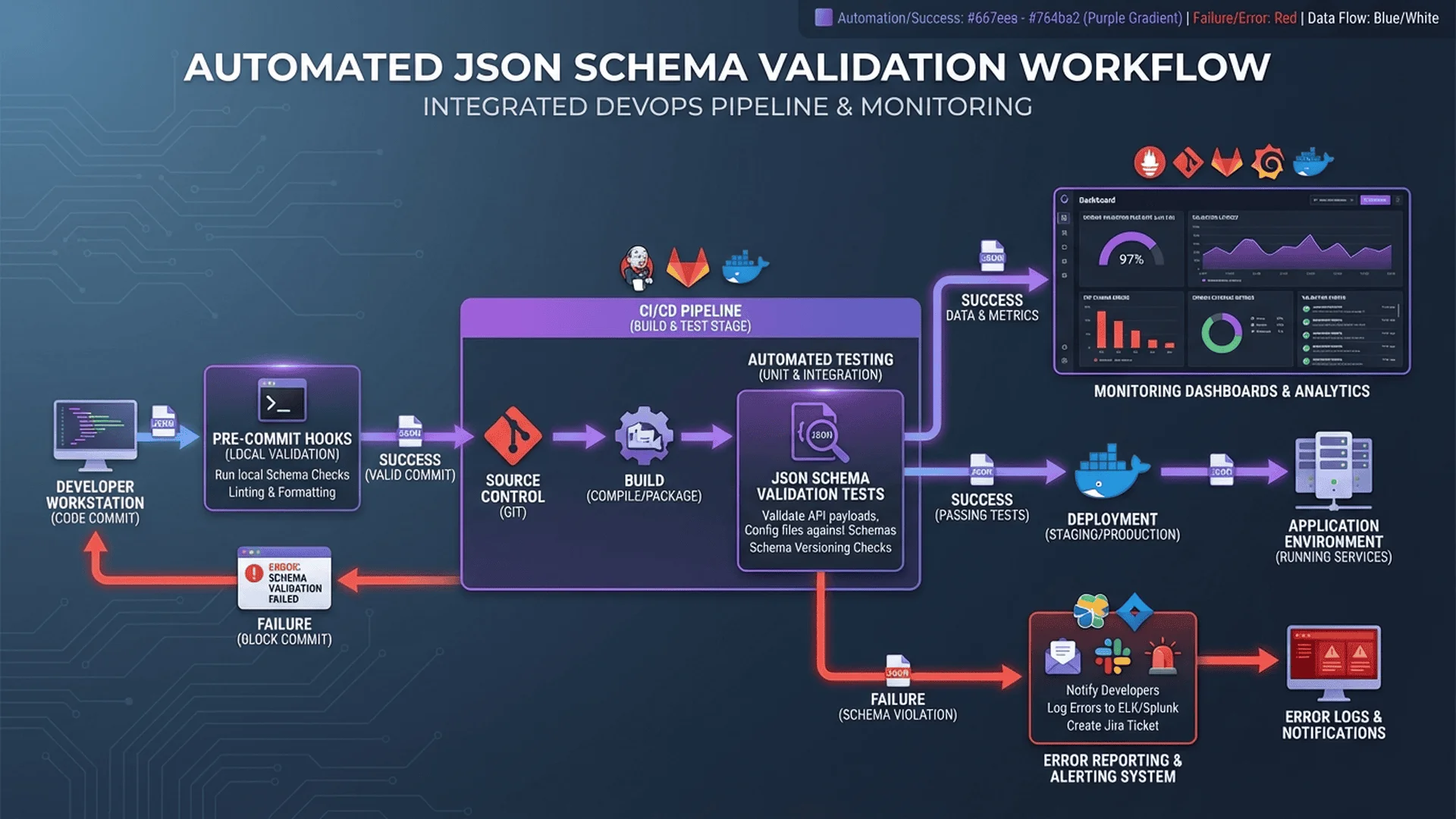
- Use in Code - Integrate into APIs, config files, tests
- Real-World Application Scenarios - API validation, data migration, frontend forms
Take Action Now
3 Recommendations:
- Start Small: Add Schema validation to critical API endpoints
- Gradually Expand: Team tries one project first, expand after success
- Keep Learning: Explore Developer Tools Category to learn about more useful tools
Key Takeaways
- ✅ JSON Schema automates data validation, reducing 90% manual checks
- ✅ Applicable in APIs, config files, data migration, and more
- ✅ Using libraries like Ajv, integrate with just a few lines of code
- ✅ Schema serves as "Single Source of Truth", reducing communication costs
Remember: Good Schema design makes systems more stable, reliable, and maintainable. Start using JSON Schema in your projects now!
Further Reading
Related Articles
Extended Reading:
1. Complete JSON Parser Guide - 7 Practical Tips from Beginner to Expert
2. Complete JSON Syntax Error Solutions - 30+ Error Examples & Fixes
3. JSON Lint Tool Comparison - In-Depth Evaluation of 7 Mainstream Tools
4. Complete Online JSON Validator Guide - 5 Steps to Quickly Detect Syntax Errors
5. JSON Formatter Best Practices - 6 Beautification Tips for Team Collaboration
6. JSON Parser FAQ Guide - 15 Common Questions Answered
Technical Resources
- Complete JSON Parser Guide - Understanding JSON fundamentals
- JSON Parser Technical Documentation - Deep dive into technical implementation
- JSON Schema Official Website
- Ajv Documentation
- Schema Store - Common config file schemas
- Understanding JSON Schema - Complete tutorial