線上JSON驗證器指南
Complete Online JSON Validator Guide | 5 Steps to Quickly Detect Syntax Errors
Pasted an API response into your code and got errors? The problem might be with the JSON format.
A single small error can completely break your application.
Good news: With the right validator, you can find all issues in 3 seconds.
JSON validation isn't just about "does it look right"—it's about ensuring the data structure is genuinely correct.
Missing comma, extra quote, encoding error—any of these will crash your program.
An online JSON validator is like a "health check tool" that catches all problems before your code runs.
What is JSON Validation and Why Is It Important?
Core Concepts of JSON Validation
JSON validation has two levels:
Level 1: Syntax Validation
- Checks if basic format is correct
- Commas, quotes, bracket matching
- Conforms to JSON standard specification
Level 2: Schema Validation
- Checks if data structure matches expectations
- Verifies field types are correct
- Ensures required fields exist
Most validators focus on "syntax validation," which is also the most common need.
Why Do Developers Need JSON Validation?
Scenario 1: API Integration
- Validate response format when integrating third-party APIs
- Avoid discovering format issues after coding is complete
Scenario 2: Config File Management
- Validate immediately after modifying config.json
- Prevent discovering config errors after deployment
Scenario 3: Data Migration
- Export JSON data from old systems
- Validate format integrity before importing into new systems
Scenario 4: Team Collaboration
- Validate JSON format during code reviews
- Standardize data format across the team
For detailed validation workflows and techniques, see Complete JSON Parser Guide.
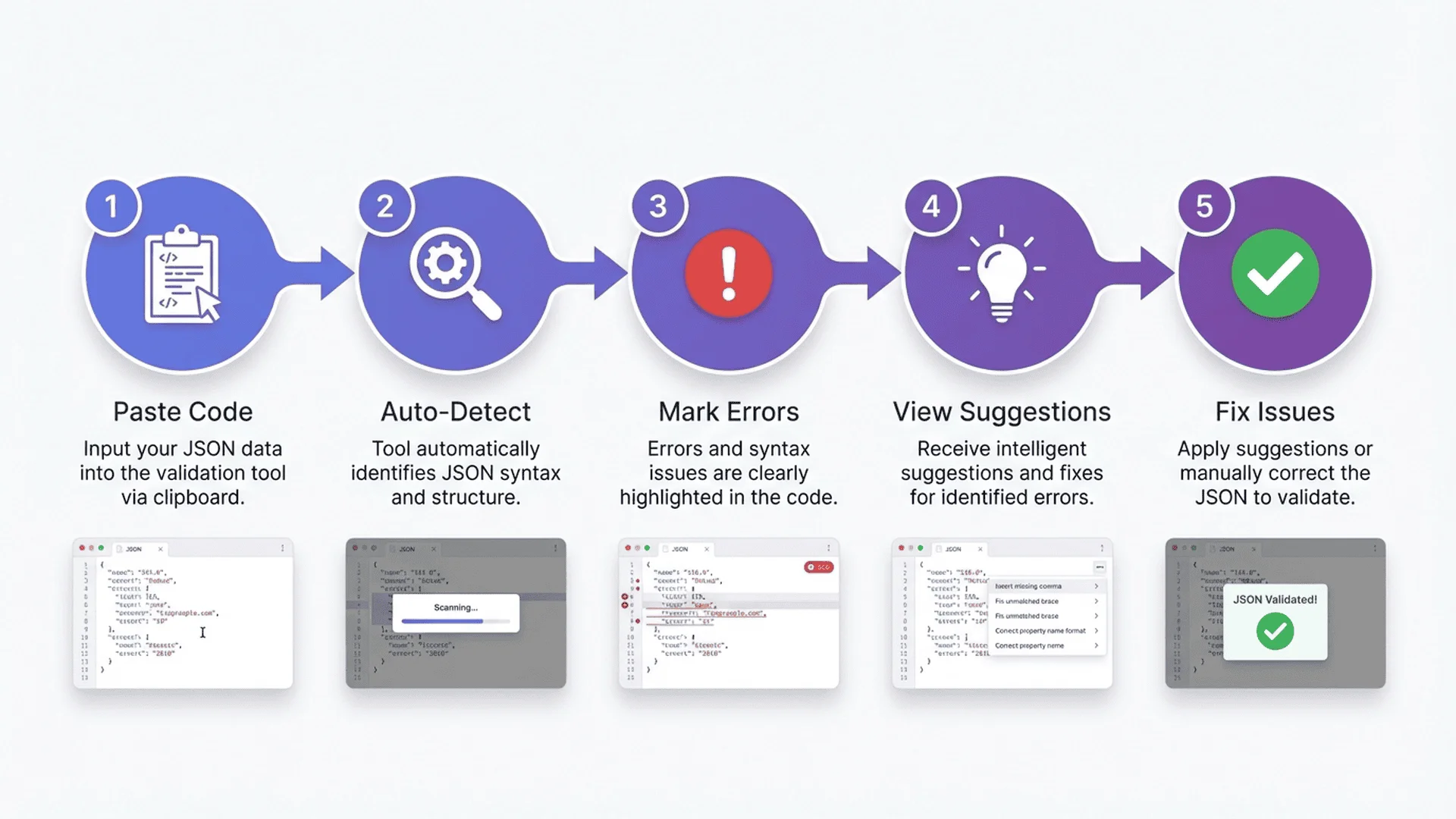
5 Steps to Quickly Validate JSON
Step 1: Prepare JSON Data
First, get the JSON data you want to validate.
Common Sources:
- API responses (Postman, curl, browser dev tools)
- Config files (config.json, package.json)
- Database exports
- Hand-written JSON code
Pro Tip:
When copying, ensure completeness, including the outermost { and }.
Step 2: Choose a Validator
Select a reliable online JSON validator.
Recommended Criteria:
- ✅ Local processing (data not uploaded)
- ✅ Real-time validation (checks as you type)
- ✅ Error location (shows line numbers)
- ✅ Free to use
We recommend JSON Parser, which processes 100% locally and is completely free.
Step 3: Paste and Validate
Paste the JSON into the validator's input box.
Click the "Validate" button (or auto-validate).
Instant Feedback:
- ✅ Format correct: Green checkmark displayed
- ❌ Has errors: Red highlights error locations
Step 4: Review Error Report
If there are errors, the validator will tell you:
Error Message Contains:
- Error type (missing comma, wrong quote, etc.)
- Error line number (which line has the error)
- Error position (which character)
- Fix suggestions
Example Error Message:
Error: Line 5, character 12
Cause: Missing comma
Suggestion: Add comma after "name": "John"
Using JSON Parser provides more detailed error explanations.
Step 5: Fix and Re-validate
Fix the issue based on the error message.
Two Fixing Methods:
Manual Fix:
- Find the error line number
- Modify according to suggestions
- Re-validate
Auto-Fix:
- Click the "Auto-Fix" button
- Tool automatically handles common errors
- Saves time and effort
After fixing, validate again to ensure complete correctness.
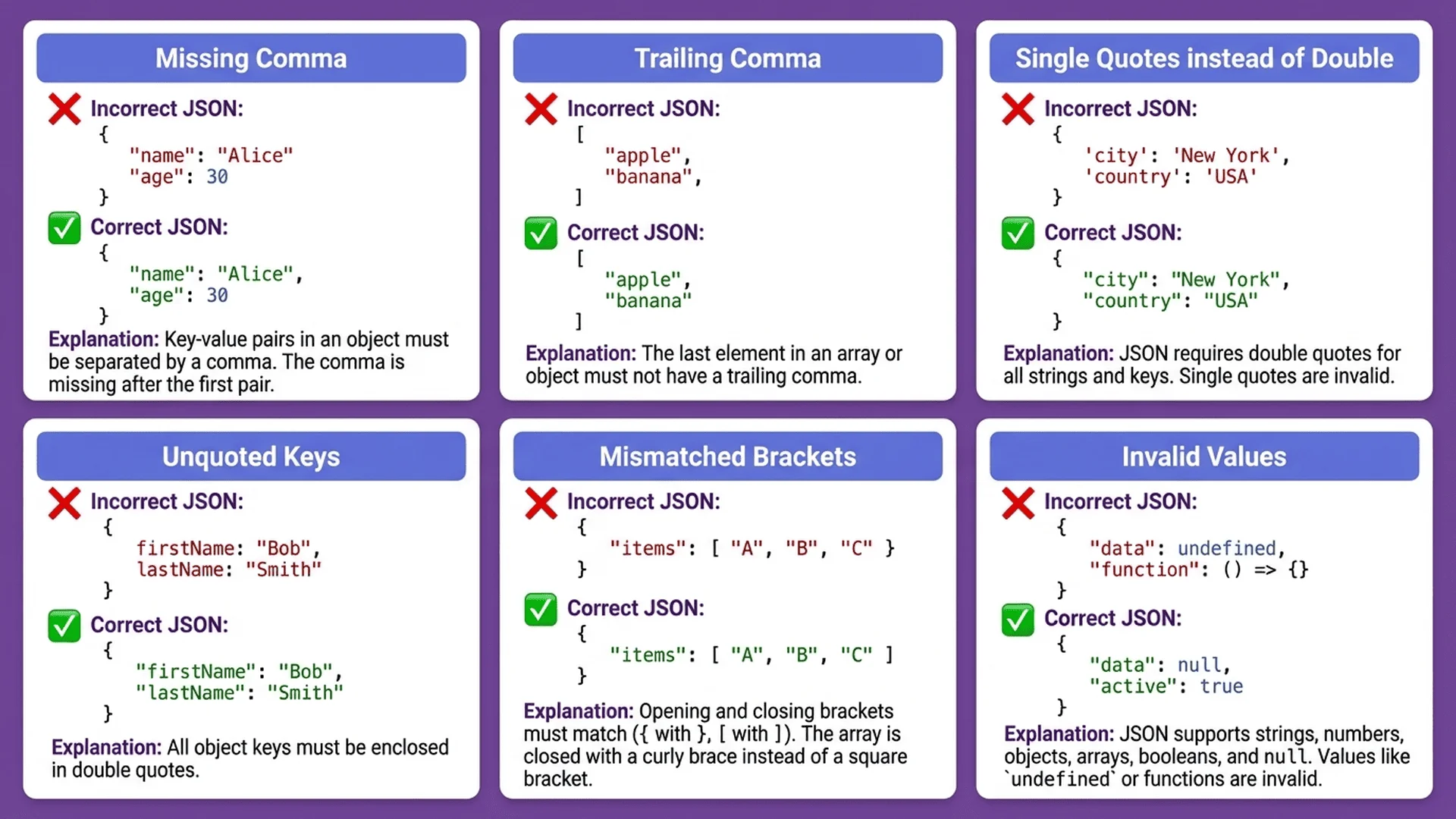
10 Common Validation Error Examples
Error 1: Missing Comma
Wrong Code:
{
  "name": "John"
  "age": 30
}
Error Message:
Missing comma on line 2
Correct Code:
{
  "name": "John",
  "age": 30
}
Error 2: Trailing Comma on Last Element
Wrong Code:
{
  "name": "John",
  "age": 30,
}
Error Message:
Trailing comma on line 3
Correct Code:
{
  "name": "John",
  "age": 30
}
Error 3: Using Single Quotes
Wrong Code:
{
  'name': 'John'
}
Error Message:
JSON only accepts double quotes
Correct Code:
{
  "name": "John"
}
Error 4: Keys Without Quotes
Wrong Code:
{
  name: "John"
}
Error Message:
Keys must be wrapped in double quotes
Correct Code:
{
  "name": "John"
}
Error 5: Numbers with Quotes
Be careful with this one! Numbers shouldn't use quotes.
Wrong Code (if you want a number):
{
  "age": "30"
}
This is a string, not a number.
Correct Code:
{
  "age": 30
}
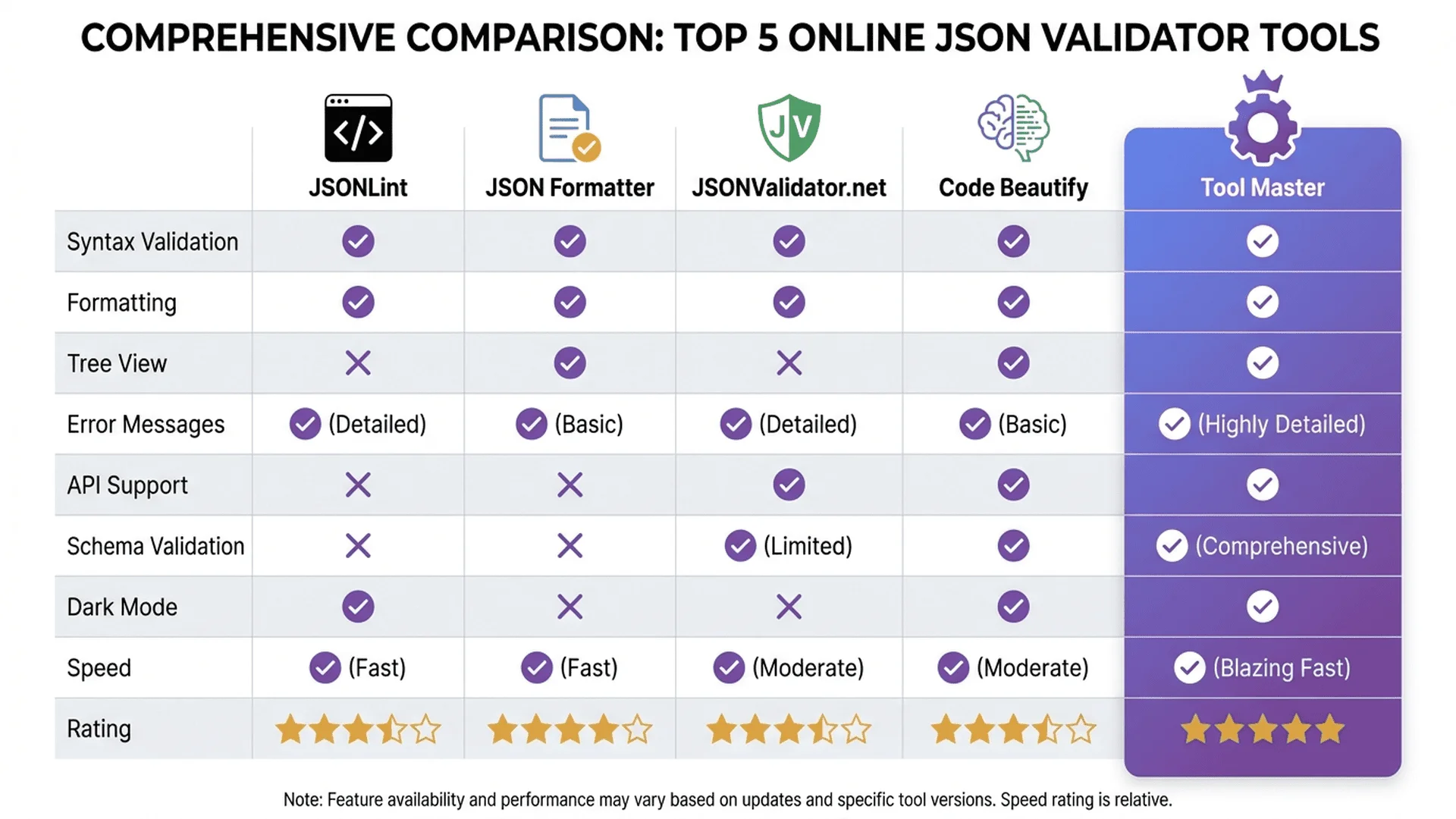
🎯 Recommended Tool Combination
These tools significantly boost efficiency when validating JSON:
| Tool | Purpose | Features |
|---|---|---|
| JSON Parser | Validate, format, fix | Automatic error location |
| Color Shower | UI color design | Quick color code conversion |
| Unit Converter | Unit conversion | 79 units supported |
💡 Pro Tip: All tools are completely free, and data is processed locally in your browser to protect your privacy.
Error 6: Mismatched Brackets
Wrong Code:
{
  "user": {
    "name": "John",
    "age": 30
}
Error Message:
Missing closing brace
Correct Code:
{
  "user": {
    "name": "John",
    "age": 30
  }
}
Error 7: Array Format Error
Wrong Code:
{
  "tags": ["tag1", "tag2",]
}
Error Message:
Array last element cannot have trailing comma
Correct Code:
{
  "tags": ["tag1", "tag2"]
}
Error 8: Unescaped Special Characters
Wrong Code:
{
  "path": "C:\Users\John"
}
Error Message:
Backslash needs to be escaped
Correct Code:
{
  "path": "C:\\Users\\John"
}
Error 9: Comments Not Allowed
Wrong Code:
{
  // This is a comment
  "name": "John"
}
Error Message:
JSON does not support comments
Correct Approach:
Remove comments, or use formats that support comments (JSON5, JSONC).
Error 10: Incorrect Null Value
Wrong Code:
{
  "value": undefined
}
Error Message:
undefined is not a valid JSON value
Correct Code:
{
  "value": null
}
Want to learn about more error types? Check out Complete JSON Syntax Error Solutions.
Advanced Validation Techniques
Technique 1: Real-Time Validation
Check as you type, discover errors immediately.
Advantages:
- Don't wait until everything is typed to validate
- See error location instantly
- Reduce accumulated errors
Tool Master's JSON Parser supports real-time validation.
Technique 2: Syntax Highlighting
Different elements marked with different colors.
Color Rules:
- Keys: Blue
- String values: Green
- Numbers: Orange
- Boolean values: Purple
Makes structure and problems easier to spot.
Technique 3: Format Then Validate
Compressed JSON makes errors hard to see.
Recommended Flow:
1. Format (beautify) first
2. Then validate
3. Errors become easier to find
Technique 4: Batch Validate Multiple Files
Need to validate multiple JSON files?
Recommended Approach:
1. Validate the first one to confirm format standards
2. Other files follow the same standards
3. Validate one by one to ensure all are correct
Automation Script Example:
# Batch validate all JSON files
for file in *.json; do
  echo "Validating $file..."
  # Use jq or Node.js for validation
done
Technique 5: Schema Validation
Advanced requirement: Not just check syntax, but also verify data structure.
Schema Validation Can Ensure:
- All required fields exist
- Field types are correct (string/number/boolean)
- Values within specified range
- Data format standardized
For detailed tutorials, see JSON Schema Validation Practical Guide.
Online vs Local Validator Comparison
Online Validators
Advantages:
- ✅ No installation, use immediately
- ✅ Cross-platform (mobile, tablet, computer)
- ✅ Auto-updates
Disadvantages:
- ⚠️ Requires internet connection
- ⚠️ Data may be uploaded to servers (depends on tool)
Suitable For:
- Occasional use
- Quick validation
- No sensitive data
Local Validators
Advantages:
- ✅ Works offline
- ✅ Data never leaves your machine
- ✅ Fast performance
Disadvantages:
- ⚠️ Requires software or package installation
- ⚠️ Manual updates needed
Suitable For:
- Frequent use
- Handling sensitive data
- Enterprise environments
Best Choice: Online Tool with Local Processing
Tool Master's JSON Parser combines the best of both:
- Online use, but local processing
- Data never uploaded, completely safe
- No installation needed, use immediately
Common Validation Scenarios in Practice
Scenario 1: API Response Validation
Problem:
After calling an API, unsure if response format is correct.
Solution Flow:
1. Copy API response
2. Paste into JSON Validator
3. Confirm format is correct
4. Review data structure
5. Start writing processing code
Scenario 2: Config File Debugging
Problem:
After modifying config.json, program won't start.
Solution Flow:
1. Open config.json
2. Copy all content
3. Paste into validator
4. Find error line number
5. Fix and re-validate
6. Save file
Scenario 3: Data Migration Validation
Problem:
Need to ensure JSON exported from old system is complete.
Solution Flow:
1. Export JSON files
2. Batch validate all files
3. Fix discovered errors
4. Validate all again
5. Import into new system
Scenario 4: Team Collaboration Check
Problem:
During code review, need to ensure JSON format is consistent.
Solution Flow:
1. Check colleague's submitted JSON
2. Validate format is correct
3. Confirm meets team standards
4. Provide fix suggestions
Summary: Best Practices for Validating JSON
JSON validation is a fundamental developer skill.
Building good habits can save massive debugging time.
Validation Best Practices
Development Phase:
- Validate immediately after each JSON modification
- Use real-time validation features
- Utilize formatting tools effectively
Testing Phase:
- Validate API responses before processing
- Batch validate all config files
- Document common error patterns
Before Production:
- Final complete validation
- Ensure all JSON files are correct
- Prepare error handling mechanisms
Next Steps
If you frequently need to validate JSON data, we recommend:
- Bookmark JSON Parser for instant access
- Learn more error types to boost debugging speed
- Explore other developer tools for even more powerful combinations
💡 Final Reminder
All Tool Master tools are completely free, with data processed locally in your browser—no privacy concerns.
No registration, no login required—just open and use.
If this article helped you, feel free to bookmark Tool Master and share it with friends who need it!
📚 Related Articles
Basic Tools:
- Complete JSON Parser Guide - 7 Practical Tips from Beginner to Expert
- JSON Parser FAQ Guide - 15 Must-Know Questions from Beginner to Expert
Error Troubleshooting:
- Complete JSON Syntax Error Solutions - 30+ Error Examples & Fixes
Advanced Validation:
- JSON Schema Validation Practical Guide - Build Automated Data Validation Systems
Formatting Tips:
- JSON Formatter Best Practices - 6 Beautification Tips for Team Collaboration
- JSON Beautifier Usage Guide - Learn 5 Beautification Techniques in 3 Minutes
References
- JSON.org, Official JSON Specification
- MDN Web Docs, JSON Syntax Guide
- IETF RFC 8259, JSON Data Interchange Format Standard